Guide & Description
Comments (0)
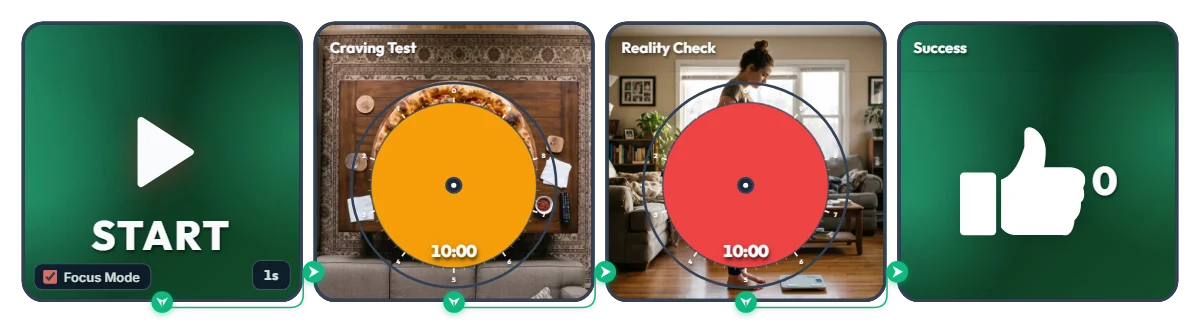
Hold Off for Just 20 Minutes Before Hitting Checkout at 11 PM! "Pizza Craving vs. Morning Scale" Snack Defense Timer
Nobody is asking you to give up late-night snacks forever—just survive 20 minutes before tapping "Place Order" on that delivery app! (Fun fact: fake midnight hunger actually vanishes after 15–20 minutes.) Built with a traffic-light color flow—Green (Safe) → Orange (Pure Temptation) → Red (Reality Check) → Green (Victory)—this one-shot 20-minute mission board tests your willpower. Hit START and Focus Mode fills your screen with a giant pizza and tomorrow morning's plot twist. • Stage 1 – The Temptation (Craving Test / 10 min): As the orange disc shrinks clockwise, a hot, freshly baked pepperoni pizza on a living room table slowly reveals itself slice by slice. ("Order now and it's at your door in 30 minutes… sure you can resist?") • Stage 2 – The Wake-Up Call (Reality Check / 10 min): Survive the first 10 minutes of internal debate and the red warning disc takes over—gradually uncovering tomorrow morning's reality: clutching your stomach while staring down at the bathroom scale. ("Could've been 0 calories if you closed the app…!") • The Reward (Success): Make it past the 20-minute danger zone and the thumbs-up (👍) counter ticks up +1 to celebrate your late-night victory. Before you even press start, click the center of either Circle Timer on screen and nudge the colored disc slightly—you can sneak a preview of that pizza slice and tomorrow's scale ending… 📌 Turn This On Whenever Midnight Munchies Strike (Everyday Scenarios) • 11 PM Delivery App Scroll Right Before Checkout Launch this as your final firewall before hitting pay on Uber Eats or DoorDash. Once you watch the full pizza appear—followed by the scale—closing the app for a glass of water suddenly feels effortless. • Binge-Watching Shows & Aimlessly Opening the Fridge When you're not actually hungry and just want to munch out of boredom, keep this running on the side of your monitor to outlast the 20-minute craving peak. • Mid-Diet "Should I Make Tonight a Cheat Night?" Inner Battle Seeing temptation (orange) and regret (red) back-to-back acts as an instant visual brake against impulse ordering. • Late-Night Cold Drink Cravings Calling for Takeout Sides Stack up those green thumbs-up (👍) wins one night at a time and wake up feeling light instead of bloated. ⚙️ How It Works & How to Customize Right on Screen Press START and after a 1-second buffer (1s), Focus Mode activates and runs the 20-minute mission in order: [Craving Test (10 min) → Reality Check (10 min) → Success Counter (+1)]. No complicated setup needed—click directly on the board above to match your willpower threshold: • Adjust Hold Time & Peek at the Ending: Click the center of the two middle Circle Timers (Craving Test, Reality Check) to shorten either round within 10 minutes (like 5 minutes each for a quick 10-minute test) and preview the image hiding behind the disc. • Change Start Delay: Click '1s' at the bottom right of the left START widget to set a pre-start countdown anywhere from 0 to 59 seconds. • Edit or Reset Your Win Counter: Hover your mouse over the right Success widget to reveal a '-1' button in the bottom-left corner (for accidental clicks) and a 'Reset' button in the bottom-right corner. ❤️ If you survived the 20 minutes, tap the heart button and tell us in the comments what late-night craving you defeated—your win might save someone else's diet tonight!
 Evander Vane
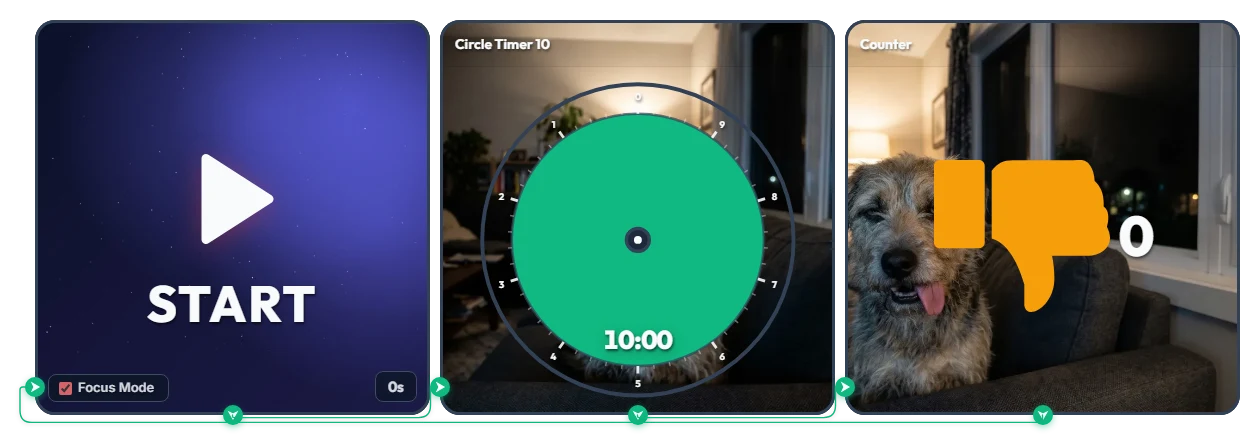
Said "Just 10 Minutes on My Phone" and Now It's 3 AM? Judging Dog's Infinite Thumbs-Down (👎) Loop Timer
A 2-hit combo of pure guilt: a deadpan dog glaring as the green disc shrinks, plus an orange thumbs-down (👎) counter ticking up every 10 minutes! Built for anyone who lies in bed saying "just 10 minutes of Shorts before sleep" and suddenly looks up to see 3:00 AM on the clock. Hit START and Focus Mode fills the entire board view, locking you into an endless 10-minute loop of accountability until you finally snap out of it and stop it yourself. • Hit 1 – The Stare (Circle Timer 10): As the green disc disappears, a furrowed-brow dog slowly emerges with a deeply disappointed glare that screams, "Seriously? You're still scrolling?" • Hit 2 – The Roast (Counter): The second your 10 minutes are up, a cheeky tongue-out dog pops up to mock you as the orange thumbs-down (👎) counter adds +1—and immediately restarts the next 10-minute countdown. Before you even press start, click the center of the Circle Timer on screen and turn the green disc slightly—you can catch an early glimpse of the judging dog lurking right behind it... 📌 Turn This On Whenever Distraction Strikes (Everyday Scenarios) • Escaping the Bedtime Shorts / Reels / TikTok Rabbit Hole Turn this on when "a few quick videos" threatens to turn into two lost hours. Watching that thumbs-down (👎) count hit 2, 3, and 4 right before your eyes will guilt-trip you into putting your phone down for good. • Study & WFH "Just a 10-Minute Break" Reality Check Launch it the moment you start slacking off at your desk. The dog keeps an unforgiving live scorecard of how many 10-minute chunks you've burned in the name of "taking a quick break." • Braking on "One More Match" or YouTube Binge-Watching Keep it open on the side of your monitor when autoplay won't let you go. The faster that green disc vanishes, the harder the dog's stare hits the brakes. • 11 PM Food Delivery App 10-Minute Cutoff Start this timer before you open a delivery app to browse menus. If you haven't decided within 10 minutes and get hit with the dog's mocking face (👎 +1), take it as a sign to skip the late-night snack! ⚙️ How It Works & How to Customize Right on Screen Press START and Focus Mode activates with zero delay (0s), filling the board with the 10-minute Circle Timer. Once time runs out, it logs +1 on the thumbs-down counter and automatically loops back into the next 10-minute round. No complicated setup needed—just click directly on the board above to set your own guilt threshold: • Shorten Your Grace Period & Preview the Stare: Click the center of the middle Circle Timer 10 widget to set a stricter limit within 10 minutes (like 5 minutes)—and sneak a peek at the dog's judging face behind the disc. • Set Prep Countdown: Click '0s' at the bottom right of the left START widget to add a start buffer of up to 59 seconds. • Adjust or Reset the Counter: Hover your mouse over the right Counter widget to reveal a '-1' button in the bottom-left corner (for accidental clicks) and a 'Reset' button in the bottom-right corner. ❤️ If you found this helpful, tap the heart button and share how you used it in the comments—your tip could be a huge help to others!
Evander Vane
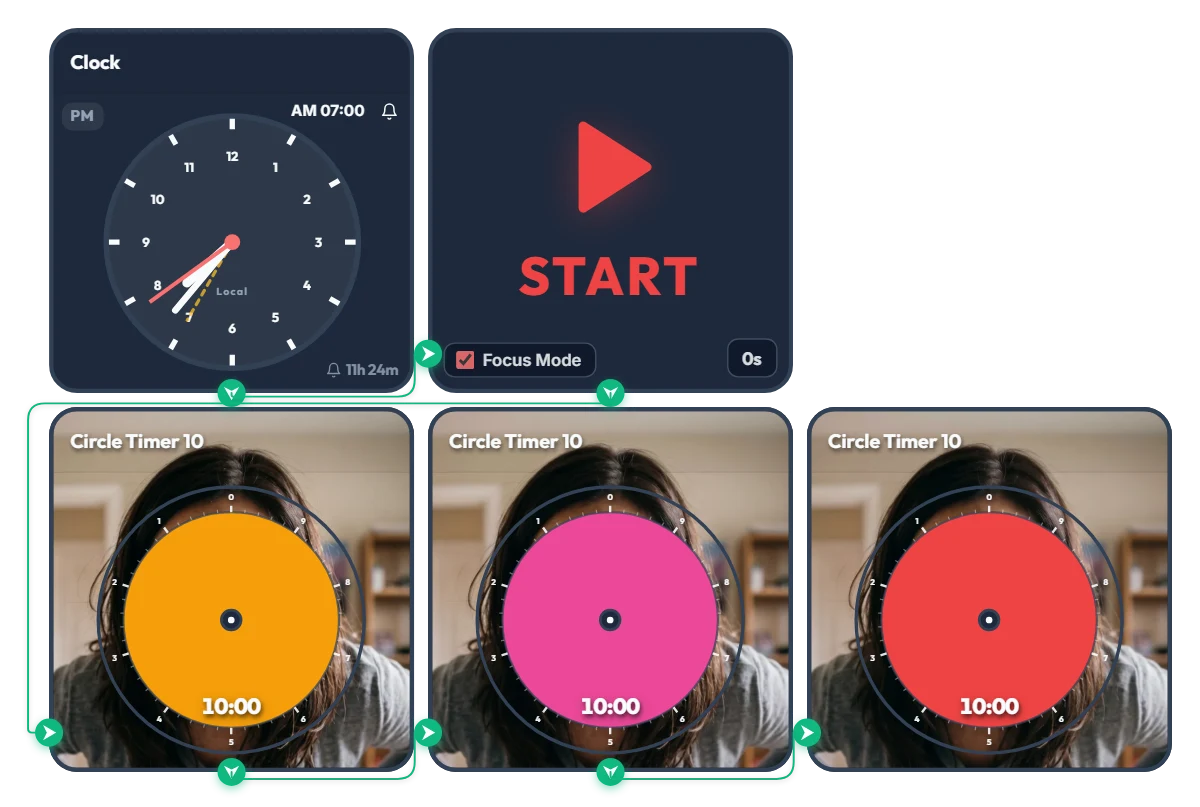
Hit Snooze for "10 More Minutes" and Summon Final-Boss Mom! 3-Stage "Angry Mom" 30-Min Warning Timer
As the orange, pink, and red discs shrink, Mom's expression turns deadlier in real time—get moving before you unlock her final boss face! Made for college students and twenty-somethings who yell "just 10 more minutes!" and accidentally burn an entire half hour, this "Angry Mom" 3-stage snooze-intervention timer keeps you accountable. When the scheduled time hits, Focus Mode expands the active timer to fill the board frame, leaving you nowhere to hide from Mom's piercing glare. And here's why this timer is truly terrifying: click the center of any circle timer on the screen and turn the disc slightly before starting—you'll instantly see what's lurking behind it... 📌 From Waking Up to Any High-Stakes 30-Minute Crunch (Everyday Scenarios) • Morning Snooze Intervention (AM 07:00 – 07:30) At 7:00 AM sharp, the alarm triggers three back-to-back 10-minute timers: - Stage 1 Orange (10 min): "Time to start waking up..." (A calm, patient stare—for now) - Stage 2 Pink (20 min): "Still under the covers?!" (Furrowed brows and rising irritation) - Stage 3 Red (30 min): "GET OUT OF BED RIGHT NOW!!" (Full final-boss meltdown) If you don't want to face Angry Mom, escape your blanket before that orange disc disappears! • 30-Minute Speed-Ready Before Class or Work Turn this on when you have exactly 30 minutes left before walking out the door. Because the color and Mom's face sharpen every 10 minutes, you won't lose track of time zoning out in front of the mirror. • 30-Minute Countdown for Assignment Deadlines, Online Exams & Course Registration Whenever you have a hard 30-minute deadline, three 10-minute pressure stages hit way harder than a single flat 30-minute timer—helping you pace yourself and sprint to the finish. • "I'll Just Check My Phone for 10 Minutes" Reality Check When a quick break turns into 30 minutes of endless short-form scrolling or gaming, put your inner voice of reason right on your monitor to snap back into focus. ⚙️ How It Works & How to Customize Right on Screen When the Clock hits AM 07:00, the START widget triggers Focus Mode and automatically runs the Orange (10 min) → Pink (10 min) → Red (10 min) circle timers across the full board view. (Don't want to wait for morning? Click 'START' directly to launch the 30-minute 3-stage countdown right now!) No complicated setup needed—just click directly on the board above to fit your routine: • Change Alarm Time: Click 'AM 07:00' at the top right of the left Clock widget to set your own wake-up or deadline time. • Set Prep Countdown: Click '0s' at the bottom right of the START widget to add a start buffer of up to 59 seconds. • Adjust Stage Durations & Sneak a Peek: Click the center of each of the 3 bottom Circle Timers to set any duration within 10 minutes (e.g., 5 minutes each for a 15-minute crunch)—and steal a quick peek at Mom's face behind the disc. ❤️ If you found this helpful, tap the heart button and share how you used it in the comments—your tip could be a huge help to others!
Evander Vane
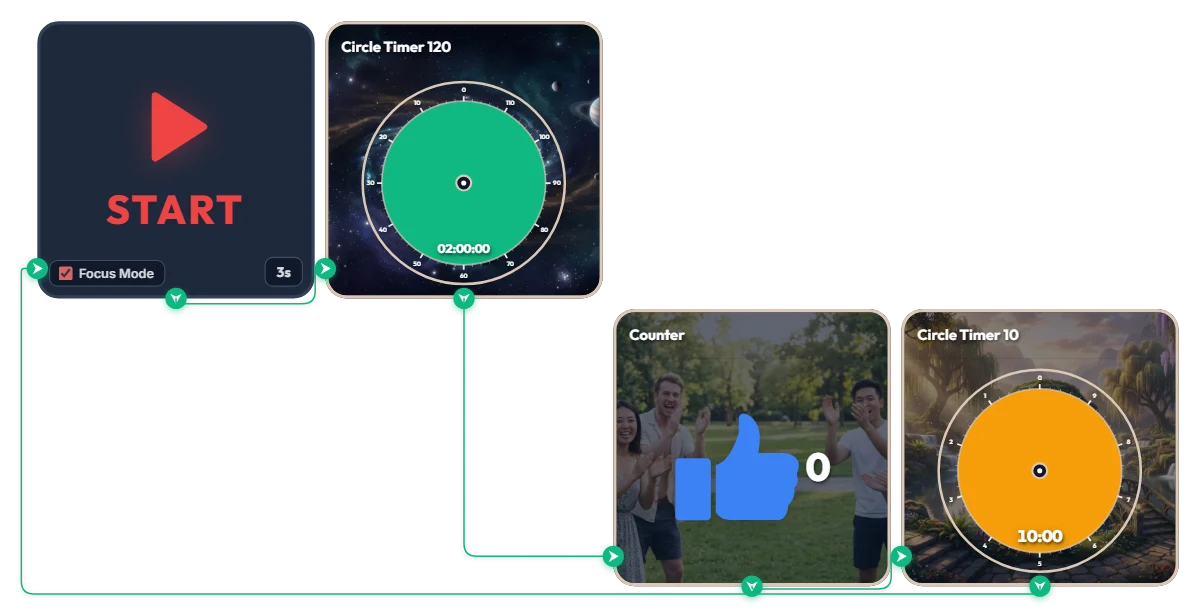
Want 2 Full Hours of Uninterrupted Deep Focus? 120-Min Deep Work + 10-Min Break Auto-Loop Timer
Tackling a complex project or long study session and want to dive deep for two full hours without breaking your flow? This automated loop timer is built for sustained, long-haul deep work. When you hit 'START', a 3-second countdown triggers Focus Mode—expanding only the active widget to fill the board frame while hiding the rest. It runs a seamless infinite loop: 120 minutes of focus (green) → achievement counter (+1) → 10 minutes of rest (orange), then automatically starts the next round. Because it doesn't force your browser into full screen, it sits cleanly alongside your work window or on a second monitor. 📌 Everyday Scenarios Where This Shines • Coding, Design & Video Editing (Deep Work) For complex tasks like programming, 3D rendering, or video editing that demand long stretches of uninterrupted momentum, the green 120-minute gauge keeps you locked in without mid-flow interruptions. • Practice Exams & Timed Mock Tests Simulate real test conditions for 2-hour certification exams, language tests, or 100-minute university entrance sections, followed by an exact 10-minute break to review your score. • Thesis Writing, Research & Deep Reading When your train of thought matters most, silence notifications for two solid hours and immerse yourself completely in a single topic or textbook. • Weekend & Holiday Study Marathons (Track Your Streak) Every time you complete a 120-minute block, the blue thumbs-up counter automatically ticks up by 1—giving you visible proof of how many sessions you crushed today. ⚙️ How It Works & How to Customize Right on Screen Press START and after 3 seconds, Focus Mode activates and fills the board with the green 120-minute timer. Once time is up, it logs +1 on the achievement counter and automatically switches to the orange 10-minute break timer—looping right back into the next 120-minute session when your break ends. No complicated setup needed—just click directly on the board above to match your personal work rhythm: • Change Prep Countdown: Click '3s' at the bottom right of the START widget to adjust the start delay anywhere from 0 to 59 seconds. • Adjust Focus Duration: Click the center of the green Circle Timer 120 widget to set any duration within 120 minutes (such as 90 or 100 minutes) that fits your stamina. • Adjust Break Duration: Click the center of the orange Circle Timer 10 widget to change your break to any duration within 10 minutes (such as 5 or 8 minutes). ❤️ If you found this helpful, tap the heart button and share how you used it in the comments—your tip could be a huge help to others!
 Amelia Miller