Curated Timer Workflows & Dashboards
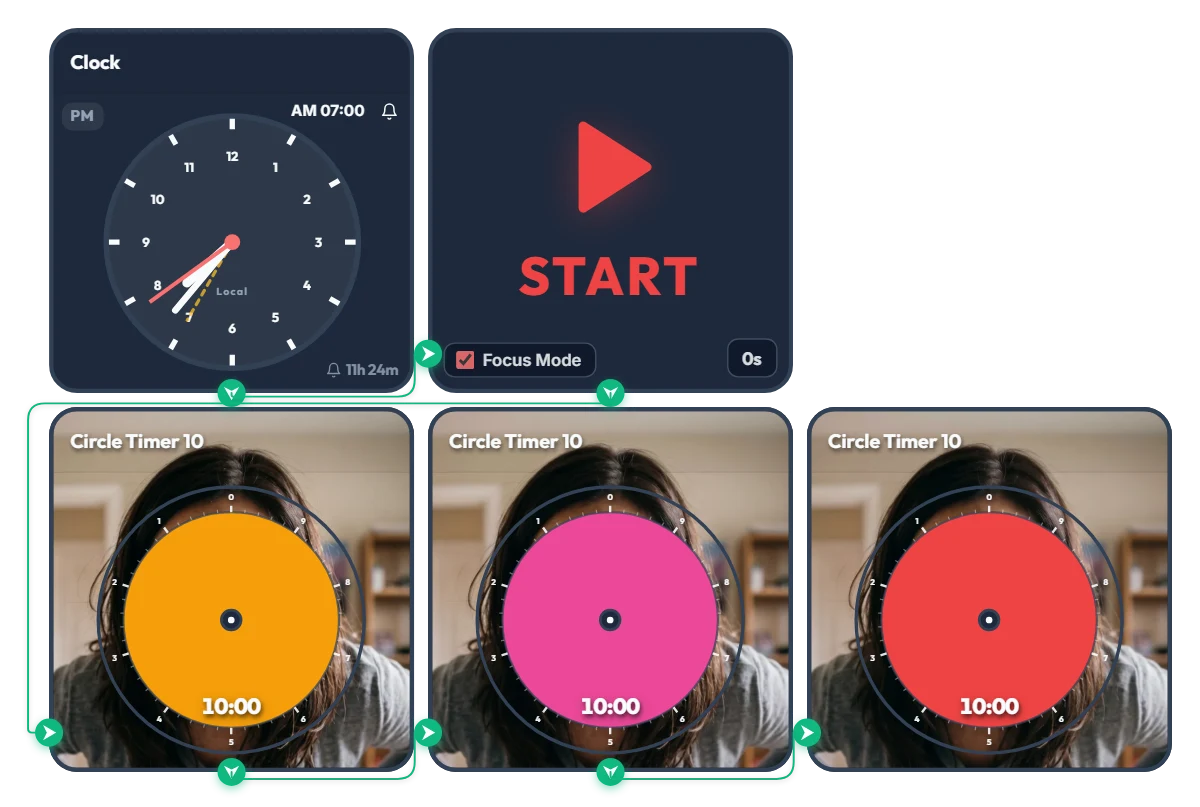
Hit Snooze for "10 More Minutes" and Summon Final-Boss Mom! 3-Stage "Angry Mom" 30-Min Warning Timer
As the orange, pink, and red discs shrink, Mom's expression turns deadlier in real time—get moving before you unlock her final boss face! Made for college students and twenty-somethings who yell "just 10 more minutes!" and accidentally burn an entire half hour, this "Angry Mom" 3-stage snooze-intervention timer keeps you accountable. When the scheduled time hits, Focus Mode expands the active timer to fill the board frame, leaving you nowhere to hide from Mom's piercing glare. And here's why this timer is truly terrifying: click the center of any circle timer on the screen and turn the disc slightly before starting—you'll instantly see what's lurking behind it... 📌 From Waking Up to Any High-Stakes 30-Minute Crunch (Everyday Scenarios) • Morning Snooze Intervention (AM 07:00 – 07:30) At 7:00 AM sharp, the alarm triggers three back-to-back 10-minute timers: - Stage 1 Orange (10 min): "Time to start waking up..." (A calm, patient stare—for now) - Stage 2 Pink (20 min): "Still under the covers?!" (Furrowed brows and rising irritation) - Stage 3 Red (30 min): "GET OUT OF BED RIGHT NOW!!" (Full final-boss meltdown) If you don't want to face Angry Mom, escape your blanket before that orange disc disappears! • 30-Minute Speed-Ready Before Class or Work Turn this on when you have exactly 30 minutes left before walking out the door. Because the color and Mom's face sharpen every 10 minutes, you won't lose track of time zoning out in front of the mirror. • 30-Minute Countdown for Assignment Deadlines, Online Exams & Course Registration Whenever you have a hard 30-minute deadline, three 10-minute pressure stages hit way harder than a single flat 30-minute timer—helping you pace yourself and sprint to the finish. • "I'll Just Check My Phone for 10 Minutes" Reality Check When a quick break turns into 30 minutes of endless short-form scrolling or gaming, put your inner voice of reason right on your monitor to snap back into focus. ⚙️ How It Works & How to Customize Right on Screen When the Clock hits AM 07:00, the START widget triggers Focus Mode and automatically runs the Orange (10 min) → Pink (10 min) → Red (10 min) circle timers across the full board view. (Don't want to wait for morning? Click 'START' directly to launch the 30-minute 3-stage countdown right now!) No complicated setup needed—just click directly on the board above to fit your routine: • Change Alarm Time: Click 'AM 07:00' at the top right of the left Clock widget to set your own wake-up or deadline time. • Set Prep Countdown: Click '0s' at the bottom right of the START widget to add a start buffer of up to 59 seconds. • Adjust Stage Durations & Sneak a Peek: Click the center of each of the 3 bottom Circle Timers to set any duration within 10 minutes (e.g., 5 minutes each for a 15-minute crunch)—and steal a quick peek at Mom's face behind the disc. ❤️ If you found this helpful, tap the heart button and share how you used it in the comments—your tip could be a huge help to others!
 Evander Vane
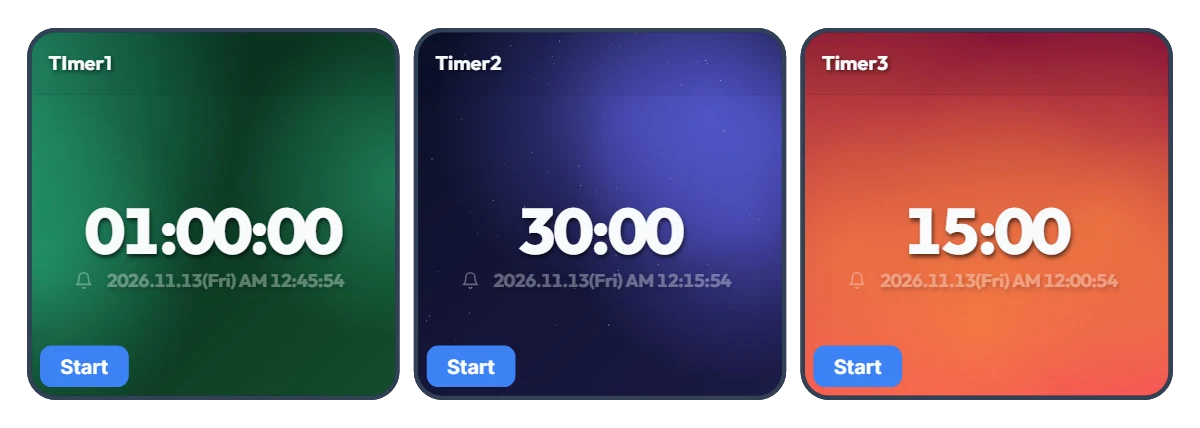
Tired of Resetting Your Timer Every Time You Switch Tasks? 3-Slot One-Click Preset Timer Board
Using just a single timer means constantly re-entering numbers every time you move on to a new task—and that small friction adds up fast. Most of us rely on a few specific time blocks throughout the day. This board places three Smart Timers side by side so you can pre-set your three most-used durations and launch any of them instantly with a single click. The default 1 hour, 30 minutes, and 15 minutes are just starting examples—whether you prefer 5, 30, and 45 minutes or 10 minutes, 20 minutes, and 2 hours, you can customize all three to fit your exact routine. Each timer also displays the exact clock time when it will finish, so you never have to do mental math. 📌 Preset Combinations to Try (Everyday Scenarios) • Work & Freelance Focus Rhythm (e.g., 50 min / 20 min / 10 min) Set three gears for your workday: 50 minutes for deep work, 20 minutes for emails and admin tasks, and 10 minutes for eye rest and stretching. Switch seamlessly with one click without breaking your momentum. • Study & Exam Prep Sessions (e.g., 100 min / 45 min / 15 min) Keep dedicated timers ready for full practice tests (100 min), video lectures or textbook chapters (45 min), and vocabulary or flashcard review (15 min) to keep your study routine effortless. • Kitchen & Household Multitasking (e.g., 40 min / 12 min / 3 min) Because all three timers run independently, you can run multiple countdowns at once. Keep an eye on a 40-minute oven roast, 12-minute pasta boiling, and a 3-minute tea steep all on one screen. • Home Workout & Stretching Flow (e.g., 30 min / 15 min / 5 min) Line up your cardio (30 min), core/strength work (15 min), and cool-down stretch (5 min) in advance so you don't have to touch your phone with sweaty hands mid-workout. • Kids' Daily Routine & Screen-Time Rules (e.g., 30 min / 20 min / 5 min) Pre-set timers for homework or reading (30 min), screen time (20 min), and toy clean-up (5 min). Seeing the large countdown and exact end time helps kids build healthy time-management habits on their own. ⚙️ How It Works & How to Set Your Own Times on Screen All three Smart Timers operate independently right as they appear on your screen: • Instant Start: Click the 'START' button at the bottom left of whichever timer you need to begin counting down immediately—with the exact finish time shown right below the digits. (You can also run two or three timers at the same time.) • Customize Your 3 Presets: Click directly on the center numbers ('01:00:00', '30:00', '15:00') of each timer to change them to your own three go-to durations. ❤️ If you found this helpful, tap the heart button and share how you used it in the comments—your tip could be a huge help to others!
 Amelia Miller