Curated Timer Workflows & Dashboards
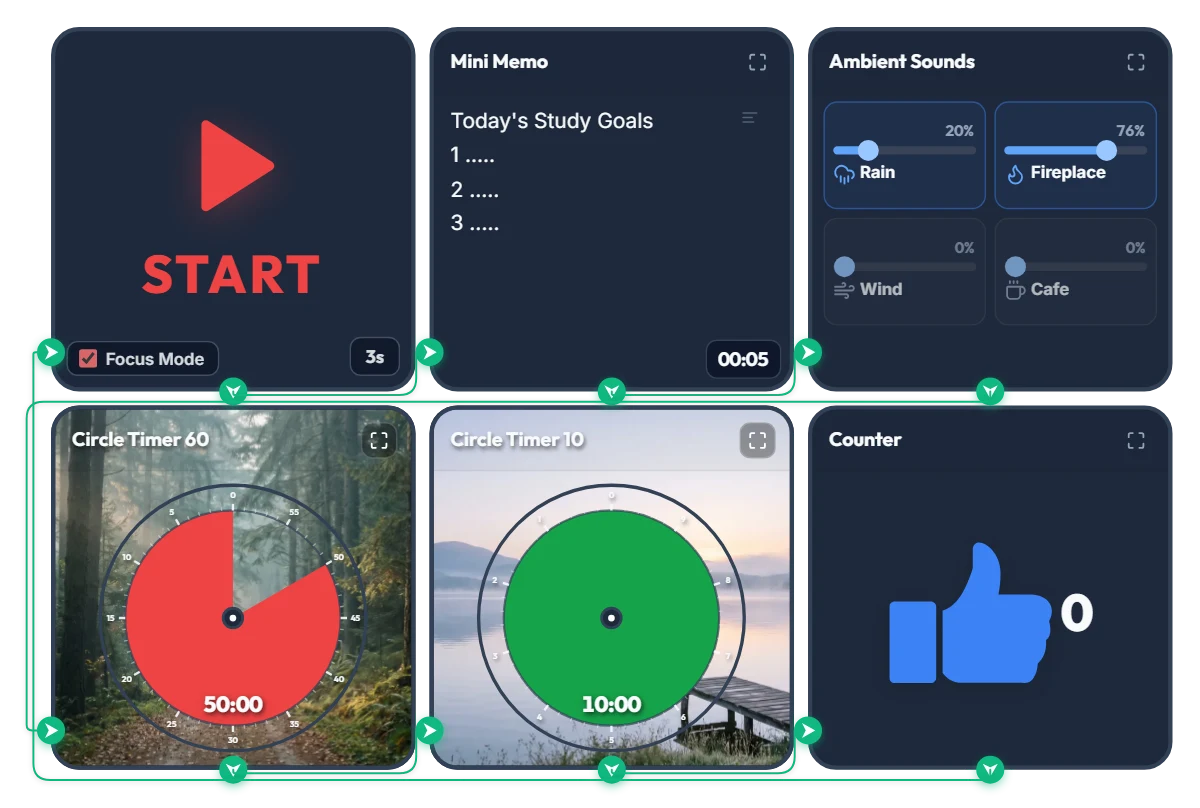
Rainy Forest Cabin Study Timer: Auto Rain & Fireplace ASMR + 50/10 Focus Loop
Tired of juggling a white-noise tab, a separate timer app, and a notepad just to start studying? Hit START once and this board automatically displays your study goals, launches a cozy rain-and-fireplace soundscape, and runs an infinite 50-minute focus / 10-minute break cycle in full-screen Focus Mode. 📌 Why a Misty Forest Trail & Calm Lakeside Background? According to Attention Restoration Theory (ART) in environmental psychology, the directed attention we use for problem-solving and deep reading fatigues rapidly after about 45–50 minutes. When you glance up to check your remaining time, seeing natural scenery like deep forest greens and calm water triggers "soft fascination"—allowing your brain and eyes to rest without breaking your study flow. As the red disc shrinks during your 50-minute session, a quiet forest trail gradually opens up; during your 10-minute break, a green disc reveals a peaceful lakeside pier to help your mind reset. ⚙️ How the 5-Step Automatic Study Loop Works 1. 5-Second Goal Splash: Hitting START enters Focus Mode and expands the Mini Memo full-screen for 5 seconds so your top 3 study goals lock into focus right before the clock starts. 2. Continuous Rain & Fireplace ASMR: A gentle mix of rain (20%) and crackling fireplace (76%) starts automatically and stays playing seamlessly across both study and break intervals so your focus is never jarred by sudden silence. 3. 50-Minute Forest Focus Disc: Track your remaining study block at a glance as the red disc counts down clockwise. 4. 10-Minute Lakeside Break Disc: Automatically switches to a 10-minute green break timer when your session finishes—step back, stretch, and rest your eyes. 5. Auto Session Counter (+1) & Infinite Loop: Every completed 50/10 block ticks the counter up by +1 and loops right back into your next study round. 💡 Quick Tips to Make It Your Own Study Space • Click directly on the "1. ....." lines inside the Mini Memo on screen to type your top 3 subjects or tasks for today. • Feel free to adjust the focus/break durations (50m/10m) and ambient sound sliders to fit your pace—just bookmark this page afterward and your custom settings will be saved right where you left them! ❤️ Cheering on everyone putting in the hours at their desk today! If this board helped you stay in the zone, tap the heart button and share your favorite study ratio or ASMR sound mix in the comments! ✨
 Amelia Miller
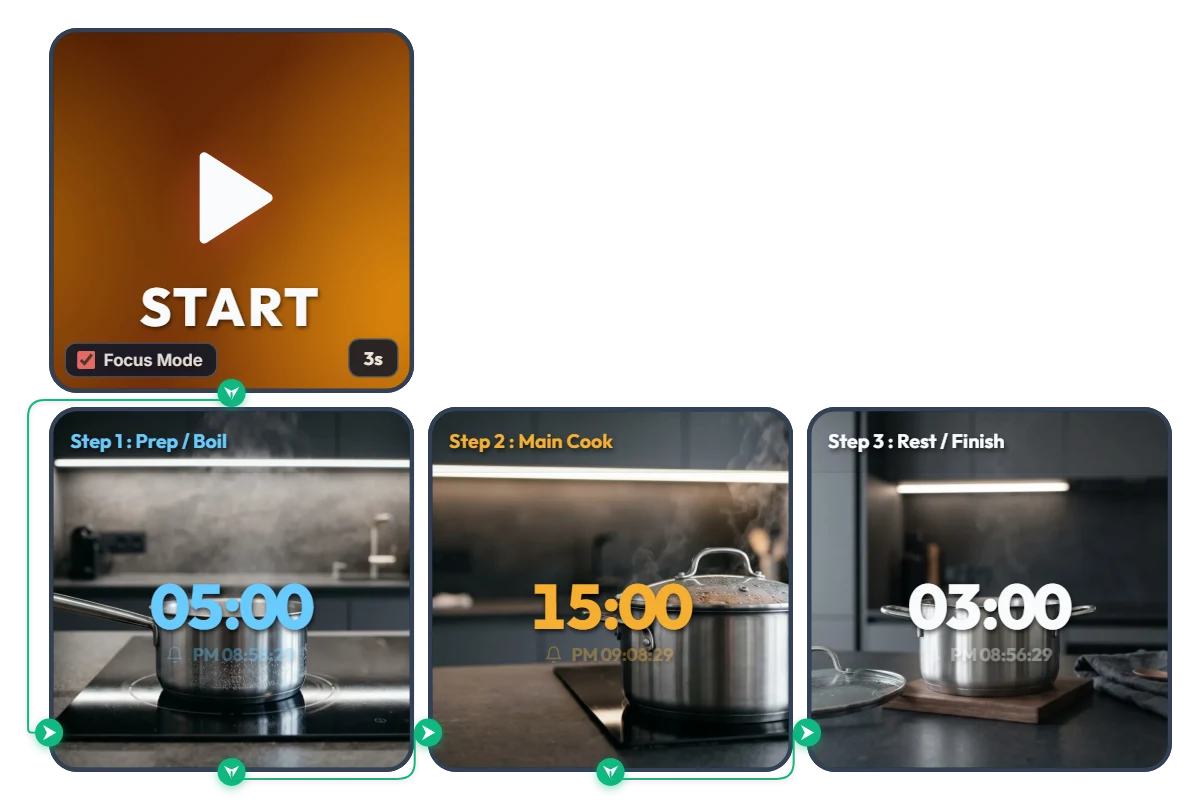
Tired of Resetting Your Timer with Wet Hands? One-Tap 3-Step Sequential Cooking Timer
Skip the hassle of tapping multiple hood timers like a busy restaurant line or wiping wet hands just to reset a single kitchen timer between steps. This 3-step sequential cooking board links your entire cooking flow automatically from start to finish. Rather than locking you into a single dish, it lets you pre-set your own rhythm—[Step 1: Prep / Boil → Step 2: Main Cook → Step 3: Rest / Finish]—and press START just once. Focus Mode fills your screen with calm, modern kitchen visuals and large color-coded digits (sky blue → warm amber → crisp white), so you can tell which stage you're in at a glance from across the kitchen. • Step 1 – Prep / Boil (05:00 / Sky Blue): Starts your first countdown against a serene view of clear water coming to a gentle simmer in a stainless steel saucepan. • Step 2 – Main Cook (15:00 / Warm Amber): Once the first alarm chimes, the board switches automatically with zero screen-tapping needed—transitioning to a covered pot steaming steadily as your dish cooks through. • Step 3 – Rest / Finish (03:00 / Crisp White): When main cooking finishes, it moves to the final resting stage—a quiet pot off the heat on a walnut trivet—so your meal finishes with the right texture and flavor. 📌 Tailor the 3-Step Flow to Whatever You're Cooking Today (Everyday Scenarios) • Pasta & Noodle Dishes Set [Step 1: Bring water to a boil] → [Step 2: Boil pasta to al dente] → [Step 3: Toss and finish in the sauce] so your noodles never turn mushy or undercooked. • Steak & Meat Searing + Resting Map out [Step 1: Preheat the skillet] → [Step 2: Sear and baste to temp] → [Step 3: Rest off the heat to lock in juices] with clean, hands-free transitions. • Risotto, Quinoa & Simmered Stews Link [Step 1: Bring broth to a boil] → [Step 2: Simmer gently on low] → [Step 3: Turn off heat and steam covered] in one uninterrupted flow. • Pour-Over Coffee, Loose-Leaf Tea & Home Baking Ideal for delicate home-café routines like [Step 1: Heat water & bloom] → [Step 2: Brew or bake] → [Step 3: Cool slightly before serving]. ⚙️ How It Works & How to Customize Times for Your Recipe Press START and after a 3-second prep countdown (3s), Focus Mode turns on and runs Step 1 → Step 2 → Step 3 automatically. An alarm sounds at the end of every stage, and the exact completion time is shown right below the countdown digits. No complicated menus needed—click directly on the board above to fit today's recipe: • Set Each Cooking Stage Duration: Click the center time digits ('05:00', '15:00', '03:00') on each of the three Smart Timers to enter any hours, minutes, or seconds before you start cooking. • Change Start Prep Delay: Click '3s' at the bottom right of the left START widget to adjust the pre-start buffer anywhere from 0 to 59 seconds. ❤️ If this made your time in the kitchen smoother, tap the heart button and share in the comments what dish you cooked with it—your timing setup could inspire someone else's dinner!
Amelia Miller
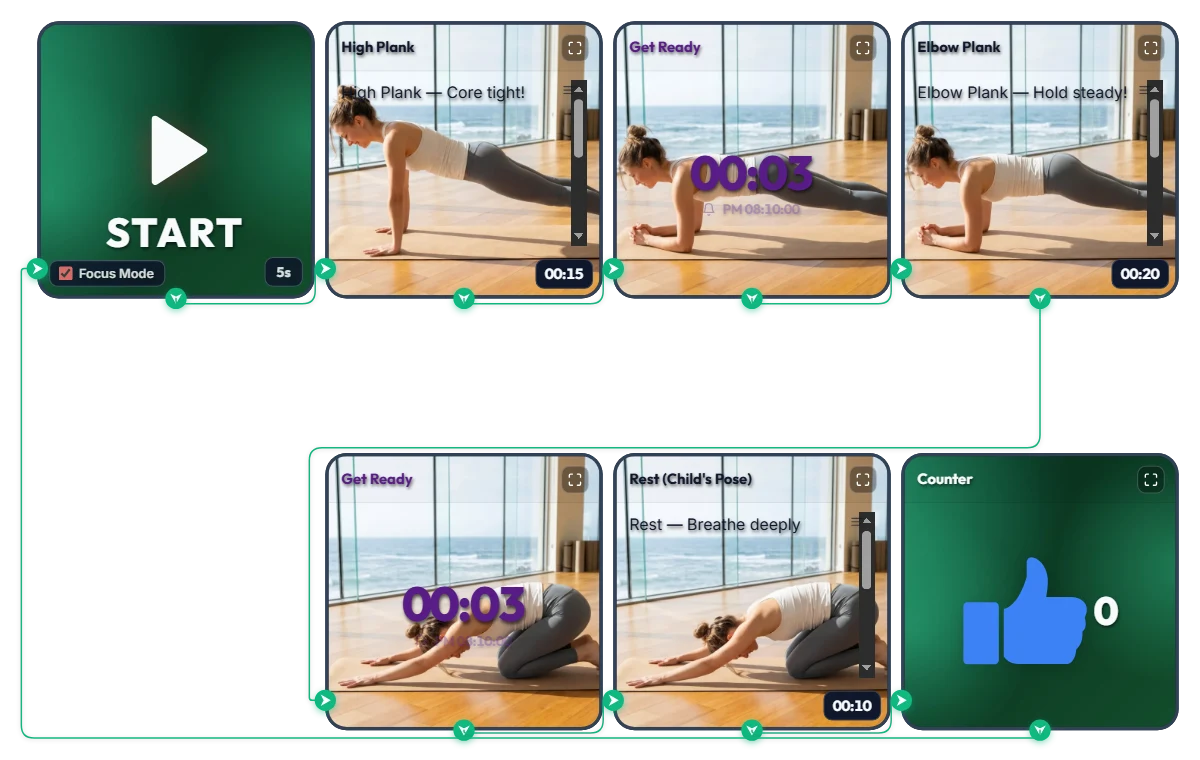
3-Minute Daily Core Routine! Customizable "High Plank → Elbow Plank" Infinite Loop Workout Timer
A shrinking top progress bar visually tracks your hold time while 3-second transition alarms cue every pose change—so you can follow along effortlessly face-down on your mat. This infinite-loop home workout board pairs High Plank (15s) → Elbow Plank (20s) → Child's Pose Rest (10s) into one quick set, automatically adding +1 to your thumbs-up (👍) counter every time you finish a round. Hit START and Focus Mode expands the exercise photos and form cues across the screen like your own personal trainer. The default times are set to an approachable beginner pace. Feel free to increase or decrease each interval to match your core strength and fitness level! 📌 Adapt It to Your Fitness Level & Schedule (Everyday Scenarios) • Beginner & Starter Core Routine (Default: 15s / 20s / 10s) New to planks? Start with the default settings and aim to complete 3 sets (about 2.5 minutes total). If holding feels tough at first, shorten the intervals to 10 seconds and focus on locking in proper form. • Intermediate & Advanced Core Challenge (e.g., 40s / 60s / 15s) If the starter pace feels too easy, bump each hold up to 30, 45, or 60+ seconds. Thanks to the 3-second transition alarm at the end of every move, you can switch positions smoothly without craning your neck to look at the screen. • 3-Minute Desk Break Refresh for Office Workers & Students Whenever your lower back and shoulders feel stiff from sitting too long, drop onto your mat for 3 to 4 quick sets. Watching the blue top progress bar shrink keeps you focused and recharges your energy fast. ⚙️ How It Works & How to Customize Durations Right on Screen Press START and after a 5-second setup countdown (5s), Focus Mode turns on and loops automatically through: [High Plank (15s) → Transition Alarm (3s) → Elbow Plank (20s) → Rest Alarm (3s) → Child's Pose Rest (10s) → Set Counter (+1)]. No complicated menus needed—click directly on the board above to tailor the difficulty: • Adjust Hold & Rest Times: Click the time display ('00:15', '00:20', '00:10') in the bottom-right corner of each of the 3 bottom exercise widgets (High Plank, Elbow Plank, Rest) to increase or decrease hours, minutes, or seconds. • Change Start Prep Time: Click '5s' at the bottom right of the left START widget to set anywhere from 0 to 59 seconds to get down into position. • Change Transition Alarm Duration: Click the center numbers ('00:03') on the two top-middle 'Get Ready' Smart Timers to adjust the buffer time between moves. • Edit or Reset the Set Counter: Hover your mouse over the top-right Counter widget to reveal a '-1' button in the bottom-left corner and a 'Reset' button in the bottom-right corner. ❤️ If you found this helpful, tap the heart button and let us know in the comments how many sets you crushed—your streak will motivate others!
Amelia Miller
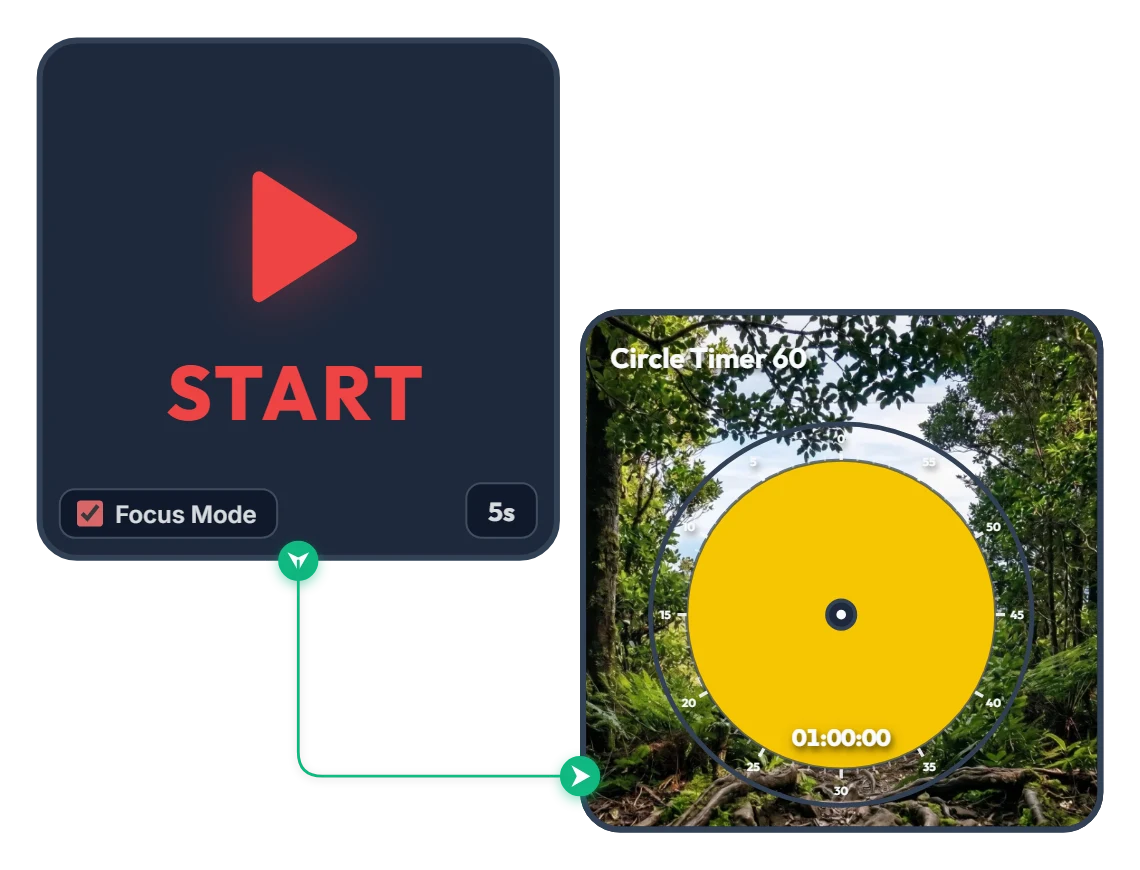
From Dense Woods to Wide-Open Skies! A 60-Minute Achievement Timer to Carry You Through the Hour
As the yellow disc shrinks and clears the dense forest, a victorious silhouette with arms raised high and a sweeping mountain range open up across your screen. Built with zero clutter—just a START widget and a 60-minute Circle Timer—this minimalist focus board helps you stay locked in until the finish line. When you press START, Focus Mode expands the timer to fill the board frame, guiding you steadily toward completing your full hour like a calm climb to the summit. 📌 Turn This On Whenever You Want to Finish Strong (Everyday Scenarios) • 1 Hour of Distraction-Free Deep Work (Office & Freelance) Put this on when tackling a major deliverable like a proposal, coding sprint, design layout, or video edit. Watching the yellow disc gradually fade and the horizon open up helps you resist distractions and claim a full, unbroken hour. • Breaking Through Today's Chapter or Practice Exam (Students) Ideal for working through dense textbook chapters or completing a full set of past exam questions. Just like emerging from thick woods onto an open ridge, you get a rewarding visual payoff at the end of a focused hour. • Miracle Morning 60-Minute Routine Start your morning grounded with reading, journaling, language practice, or meditation. The warm yellow glow and serene mountain scenery gently wake up your focus. • 1 Hour of Quiet Reading & Reflective Writing Silence phone notifications and message alerts for a full hour to immerse yourself deeply in a book or a piece of writing on the side of your monitor. ⚙️ How It Works & How to Customize Right on Screen Press START and after a 5-second breath-centering countdown (5s), Focus Mode activates—filling the board with the yellow 60-minute Circle Timer and starting the countdown. No complicated setup needed—just click directly on the board above to match your pace: • Change Prep Countdown: Click '5s' at the bottom right of the left START widget to adjust the pre-start pause anywhere from 0 to 59 seconds. • Adjust Focus Duration: Click the center of the right Circle Timer 60 widget to set any duration within 60 minutes (such as 45 or 50 minutes) that fits your goal. ❤️ If you found this helpful, tap the heart button and share how you used it in the comments—your tip could be a huge help to others!
Amelia Miller
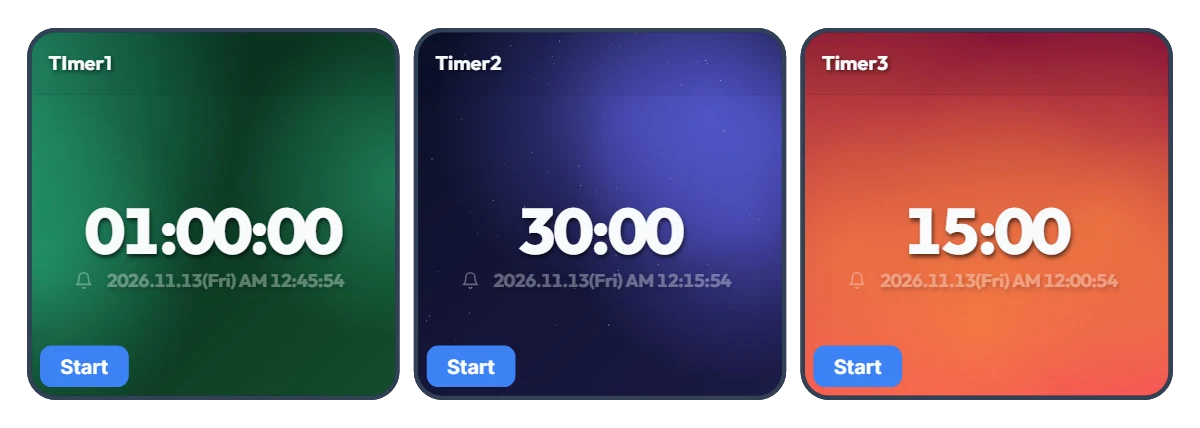
Tired of Resetting Your Timer Every Time You Switch Tasks? 3-Slot One-Click Preset Timer Board
Using just a single timer means constantly re-entering numbers every time you move on to a new task—and that small friction adds up fast. Most of us rely on a few specific time blocks throughout the day. This board places three Smart Timers side by side so you can pre-set your three most-used durations and launch any of them instantly with a single click. The default 1 hour, 30 minutes, and 15 minutes are just starting examples—whether you prefer 5, 30, and 45 minutes or 10 minutes, 20 minutes, and 2 hours, you can customize all three to fit your exact routine. Each timer also displays the exact clock time when it will finish, so you never have to do mental math. 📌 Preset Combinations to Try (Everyday Scenarios) • Work & Freelance Focus Rhythm (e.g., 50 min / 20 min / 10 min) Set three gears for your workday: 50 minutes for deep work, 20 minutes for emails and admin tasks, and 10 minutes for eye rest and stretching. Switch seamlessly with one click without breaking your momentum. • Study & Exam Prep Sessions (e.g., 100 min / 45 min / 15 min) Keep dedicated timers ready for full practice tests (100 min), video lectures or textbook chapters (45 min), and vocabulary or flashcard review (15 min) to keep your study routine effortless. • Kitchen & Household Multitasking (e.g., 40 min / 12 min / 3 min) Because all three timers run independently, you can run multiple countdowns at once. Keep an eye on a 40-minute oven roast, 12-minute pasta boiling, and a 3-minute tea steep all on one screen. • Home Workout & Stretching Flow (e.g., 30 min / 15 min / 5 min) Line up your cardio (30 min), core/strength work (15 min), and cool-down stretch (5 min) in advance so you don't have to touch your phone with sweaty hands mid-workout. • Kids' Daily Routine & Screen-Time Rules (e.g., 30 min / 20 min / 5 min) Pre-set timers for homework or reading (30 min), screen time (20 min), and toy clean-up (5 min). Seeing the large countdown and exact end time helps kids build healthy time-management habits on their own. ⚙️ How It Works & How to Set Your Own Times on Screen All three Smart Timers operate independently right as they appear on your screen: • Instant Start: Click the 'START' button at the bottom left of whichever timer you need to begin counting down immediately—with the exact finish time shown right below the digits. (You can also run two or three timers at the same time.) • Customize Your 3 Presets: Click directly on the center numbers ('01:00:00', '30:00', '15:00') of each timer to change them to your own three go-to durations. ❤️ If you found this helpful, tap the heart button and share how you used it in the comments—your tip could be a huge help to others!
Amelia Miller
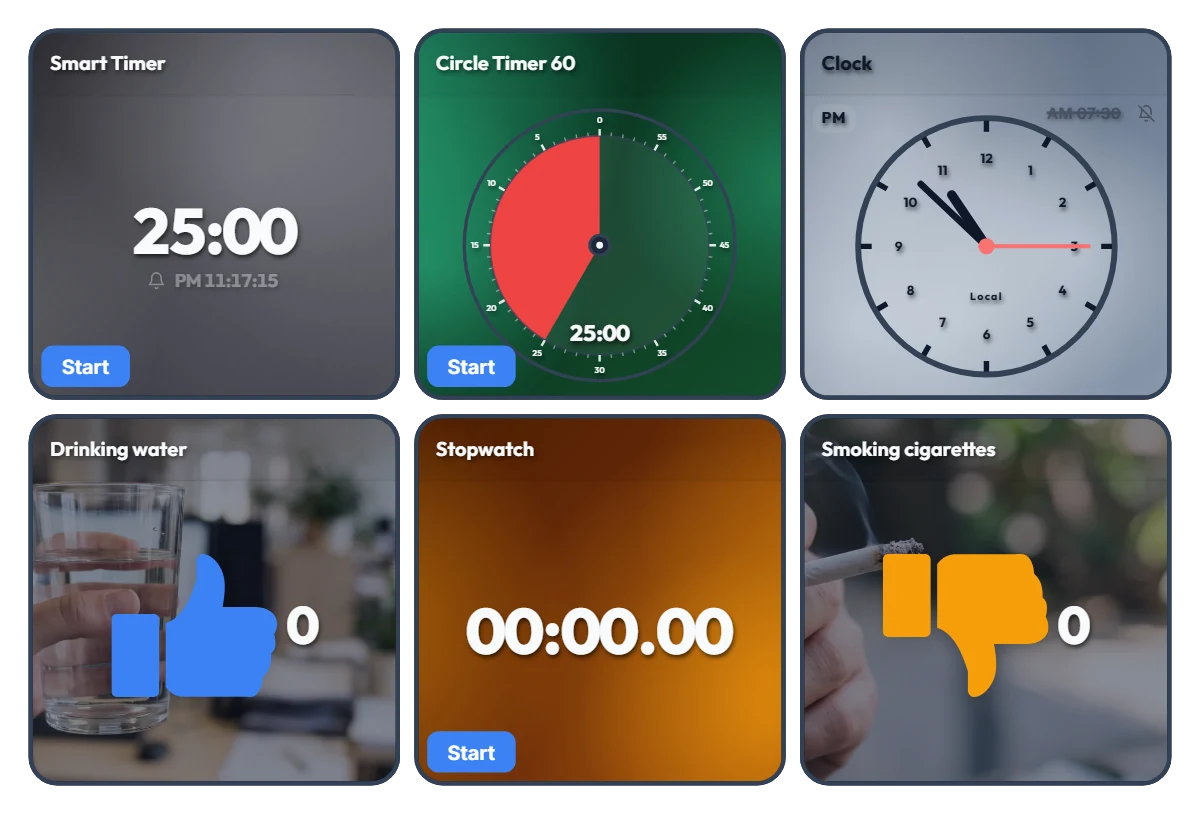
Track Work Hours, Water Intake & Cigarettes on One Screen! All-in-One Desk Dashboard
Tired of juggling separate timer tabs, stopwatch apps, and habit trackers while working or studying? Just keep this single dashboard open on the side of your monitor. This board is an "all-in-one desk control tower" featuring 6 independent tools on one screen—with no auto-linking between widgets. On the top row, timers and a clock keep your current flow and deadlines in check. On the bottom row, a stopwatch tracks your cumulative work hours while one-click counters let you intuitively log daily habits like drinking water (👍) and smoking cigarettes (👎). 📌 Everyday Scenarios Where This Shines • All-in-One Work Dashboard for Office & Remote Workers Measure your total daily work hours with the bottom stopwatch while checking your exact end time on the top Smart Timer. Log your water intake with the blue thumbs-up counter so you stay hydrated during deep work, and track cigarette counts with the orange counter to see your daily patterns at a glance. • Pure Focus Time + Wellness Tracker for Students & Freelancers Accumulate your actual, distraction-free study or work hours with the stopwatch, and use the Circle Timer to set strict time limits for practice tests or tasks. Tracking how many glasses of water you drink also helps keep your energy steady during long desk sessions. • Visual Habit Ledger: Good Habits (+) vs. Habits to Cut Back (-) With the Drinking water (👍) and Smoking cigarettes (👎) counters placed side by side, you get an immediate numeric contrast of your day. Seeing the numbers add up in real time makes it much easier to pace yourself consciously. • Desk Clock & Schedule Alarm in One Turn on the alarm in the top-right clock widget to stay on top of end-of-day wrap-ups, meetings, and break times without opening a separate alarm app. ⚙️ How Each Widget Works & How to Use Them Directly on Screen All 6 widgets operate independently right as they appear on your screen: • Smart Timer (Top Left): Click the bottom 'START' button to run it, or click the center numbers to set your desired duration. It displays the exact clock time when the timer will finish—great for managing deadlines. • Circle Timer 60 (Top Center): Click the bottom 'START' button to begin, and click the center of the circle to freely adjust the duration within 60 minutes. • Clock (Top Right): Click the bell icon (currently off) to toggle the alarm on or off, and click the alarm time ('AM 07:30') next to the bell to change when it rings. • Habit Counters – Drinking water / Smoking cigarettes (Bottom Left & Right): Click anywhere on the widget area to add +1. Hover your mouse over a widget to reveal a '-1' button in the bottom-left corner (handy for accidental clicks) and a 'Reset' button in the bottom-right corner. • Stopwatch (Bottom Center): Click the bottom 'START' button to freely track your total work hours or pure study time for the day. ❤️ If you found this helpful, tap the heart button and share how you used it in the comments—your tip could be a huge help to others!
Amelia Miller
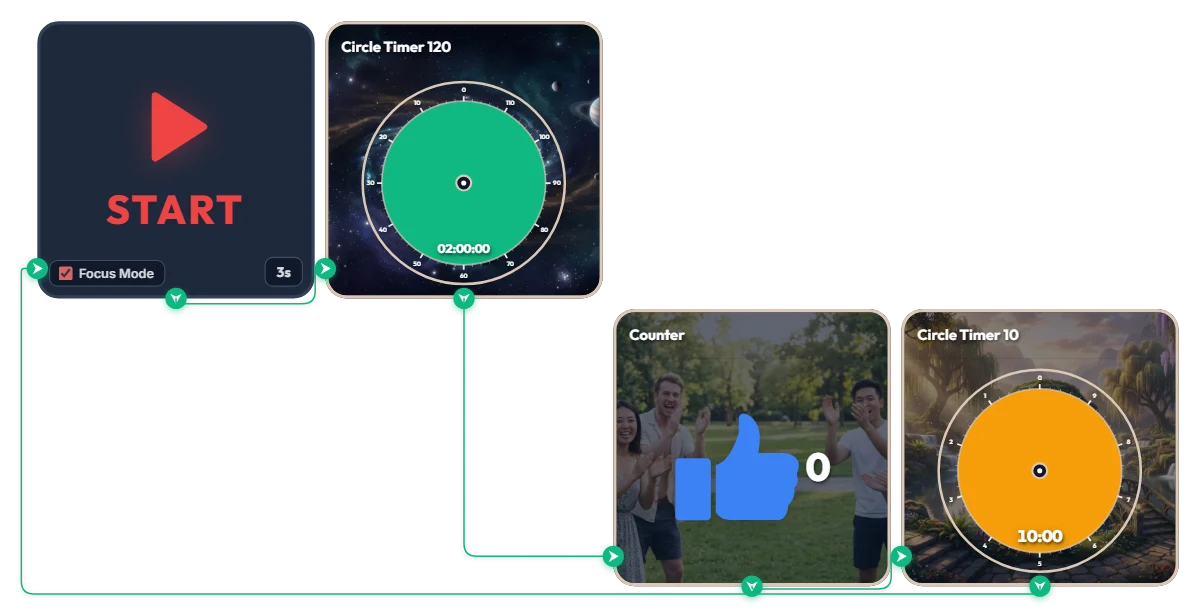
Want 2 Full Hours of Uninterrupted Deep Focus? 120-Min Deep Work + 10-Min Break Auto-Loop Timer
Tackling a complex project or long study session and want to dive deep for two full hours without breaking your flow? This automated loop timer is built for sustained, long-haul deep work. When you hit 'START', a 3-second countdown triggers Focus Mode—expanding only the active widget to fill the board frame while hiding the rest. It runs a seamless infinite loop: 120 minutes of focus (green) → achievement counter (+1) → 10 minutes of rest (orange), then automatically starts the next round. Because it doesn't force your browser into full screen, it sits cleanly alongside your work window or on a second monitor. 📌 Everyday Scenarios Where This Shines • Coding, Design & Video Editing (Deep Work) For complex tasks like programming, 3D rendering, or video editing that demand long stretches of uninterrupted momentum, the green 120-minute gauge keeps you locked in without mid-flow interruptions. • Practice Exams & Timed Mock Tests Simulate real test conditions for 2-hour certification exams, language tests, or 100-minute university entrance sections, followed by an exact 10-minute break to review your score. • Thesis Writing, Research & Deep Reading When your train of thought matters most, silence notifications for two solid hours and immerse yourself completely in a single topic or textbook. • Weekend & Holiday Study Marathons (Track Your Streak) Every time you complete a 120-minute block, the blue thumbs-up counter automatically ticks up by 1—giving you visible proof of how many sessions you crushed today. ⚙️ How It Works & How to Customize Right on Screen Press START and after 3 seconds, Focus Mode activates and fills the board with the green 120-minute timer. Once time is up, it logs +1 on the achievement counter and automatically switches to the orange 10-minute break timer—looping right back into the next 120-minute session when your break ends. No complicated setup needed—just click directly on the board above to match your personal work rhythm: • Change Prep Countdown: Click '3s' at the bottom right of the START widget to adjust the start delay anywhere from 0 to 59 seconds. • Adjust Focus Duration: Click the center of the green Circle Timer 120 widget to set any duration within 120 minutes (such as 90 or 100 minutes) that fits your stamina. • Adjust Break Duration: Click the center of the orange Circle Timer 10 widget to change your break to any duration within 10 minutes (such as 5 or 8 minutes). ❤️ If you found this helpful, tap the heart button and share how you used it in the comments—your tip could be a huge help to others!
Amelia Miller
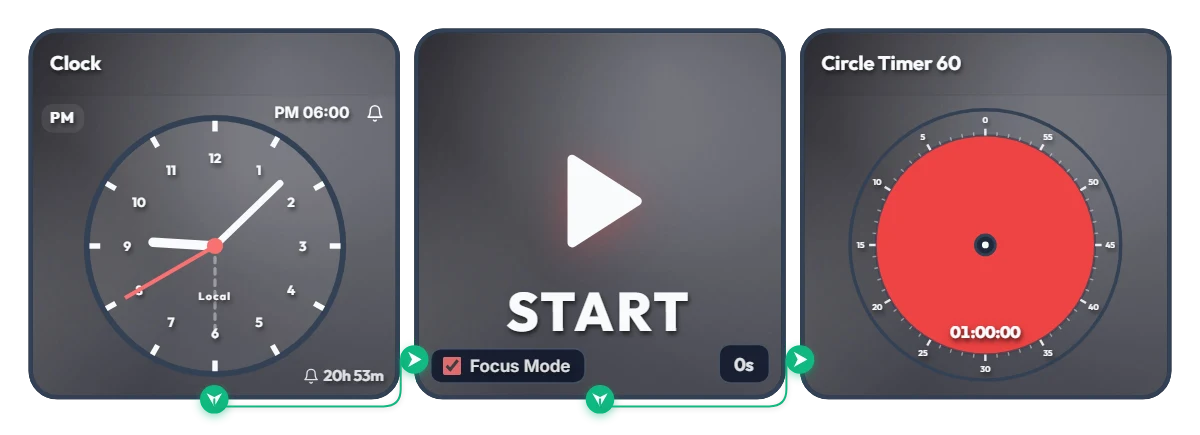
Keep Saying "I'll Start at 6 PM" and Putting It Off? Auto-Start 1-Hour Focus Timer
Ever tell yourself "I'll start right at 6:00 PM," only to lose an hour scrolling on your phone? Stop relying on willpower and let your screen flip the switch for you. This board is a scheduled automation routine. The moment your set time arrives (6:00 PM by default), Focus Mode cleanly hides the other widgets and expands the 60-minute circle timer to fill the entire board frame—starting the countdown immediately. Because it doesn't force your browser into full screen, it's ideal for keeping alongside your work window or on a second monitor. 📌 Everyday Scenarios Where This Shines • After-Work Evening Routine (PM 06:00 – 07:00) Beat post-work sluggishness. At 6:00 PM sharp, your board transforms into a bold red 60-minute timer, nudging you straight into reading, language learning, or a home workout without procrastinating. • Work-From-Home Morning Kickoff (AM 09:00) Struggling to transition from the couch to your desk? Change the alarm to 9:00 AM so your screen automatically switches into focus view and protects your first golden hour of deep work. • Evening Study & Exam Prep (PM 08:00) Overcome post-dinner fatigue with a clear visual rule: when the clock hits 8:00 PM, commit to one distraction-free hour at your desk. • 1-Hour Deadline Sprint Set the alarm one hour before a report or assignment is due. Watching the red visual gauge shrink keeps your focus locked in until the final second. ⚙️ How It Works & How to Customize Right on Screen When the Clock hits the scheduled time, the START widget activates Focus Mode—hiding the other widgets so the 60-minute circle timer fills the board and begins counting down right away. No complicated setup needed—just click directly on the board above to tailor it to your routine: • Change Alarm Time: Click 'PM 06:00' at the top right of the left Clock widget to set your preferred start time. • Set Prep Countdown: Click '0s' at the bottom right of the middle START widget to add a buffer delay of up to 59 seconds (great if you need a moment to sit down and get ready after the alarm goes off!). • Adjust Timer Duration: Click the center of the right Circle Timer widget to set any duration within 60 minutes that matches your focus stamina. ❤️ If you found this helpful, tap the heart button and share how you used it in the comments—your tip could be a huge help to others!
Amelia Miller
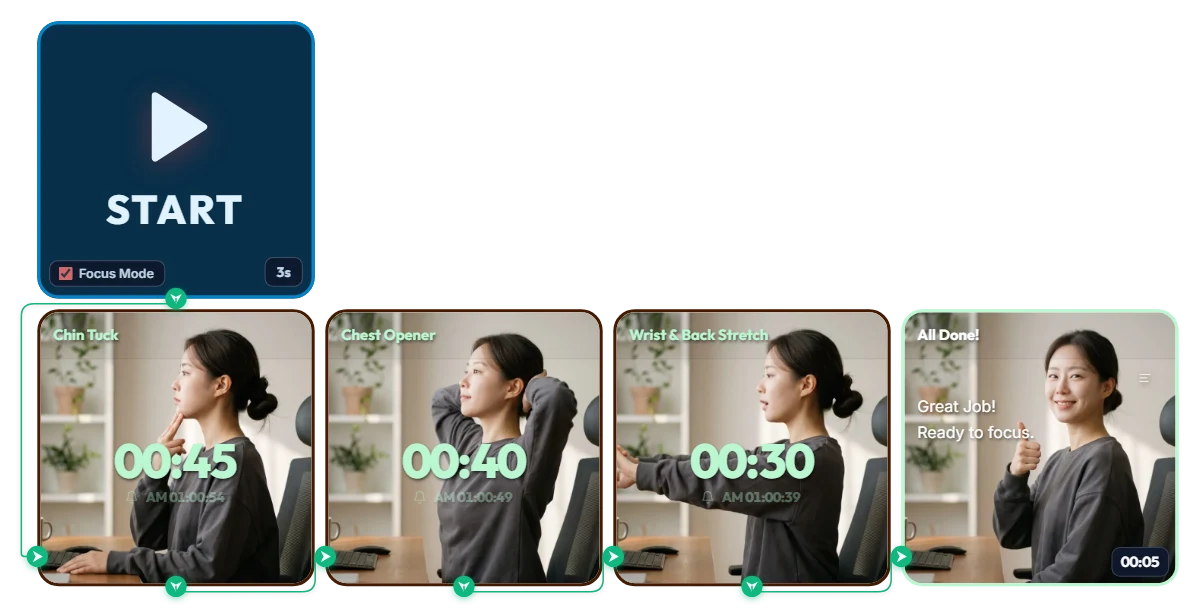
One-Click 3-Step Follow-Along Stretch Timer
Hours of studying, working, or reading can leave your chin jutting forward and your shoulders and upper back rounded and stiff. Follow along with this quick 1-minute-55-second routine to reset your spine and wrists in one go—give it a try right now! Step 1: Chin Tuck — Realign Forward Neck Posture (45s) Prep: Sit all the way back with your hips pressed firmly against the chair backrest and keep your spine tall and straight. Move: Place the index and middle fingers of one hand on the front of your chin and gently glide your chin straight back horizontally toward the back of your neck, like sliding a drawer shut. Breath: Feel a gentle stretch along the back of your neck, hold for 5 seconds, then slowly relax. Repeat 6 times over 45 seconds. Step 2: Chest Opener (Thoracic Extension) — Open Rounded Shoulders & Chest (40s) Prep: Lightly interlace your fingers behind the back of your head. Move: Open both elbows out wide to the sides as far as comfortable while lifting the center of your chest diagonally upward. Breath: Rest your gaze comfortably upward at an angle and breathe deeply while holding the open chest for 10 seconds. Repeat 3–4 times over 40 seconds. Step 3: Wrist & Back Stretch — Loosen Stiff Wrists & Upper Body (30s) Prep: Interlace your hands in front of your chest. Move: Turn your palms outward facing your monitor and extend both arms straight out in front of you at chest height for a refreshing stretch. Breath: Feel your wrists and finger joints lengthen, hold steadily for 15 seconds, then lightly shake your hands out. Complete 2 rounds in total.
Amelia Miller
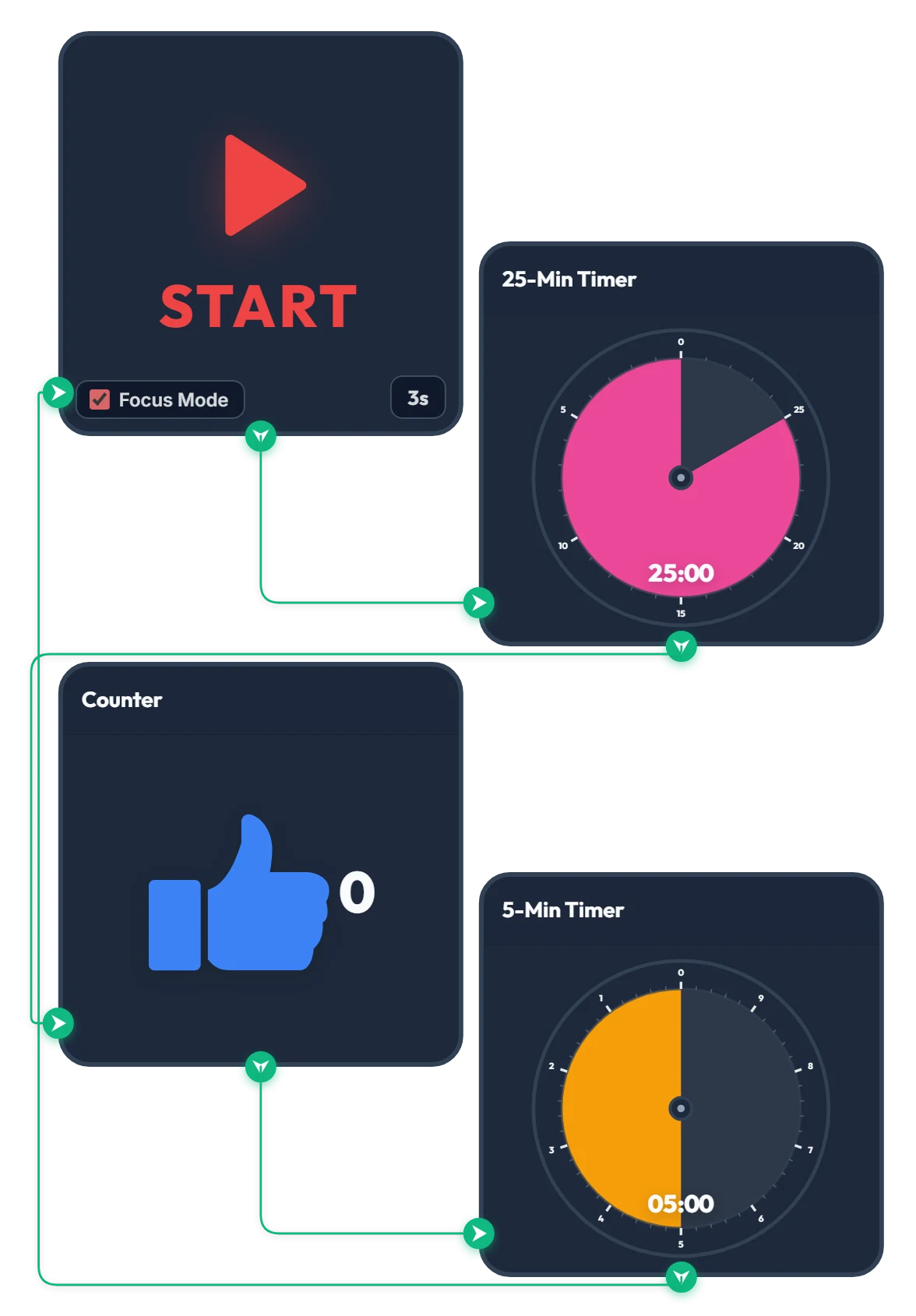
25-Min Focus & 5-Min Break Pomodoro Timer
Press START and, after a quick 3-second countdown, the 25-minute focus timer begins automatically. Once the 25 minutes are up, the counter goes up by 1 and the 5-minute break timer starts right away. When your 5-minute break finishes, it loops straight back to the 3-second countdown so the cycle keeps going on its own. How many cycles can you make it through? Give it a try—if you find it helpful, please tap the heart and leave a comment below!
Amelia Miller