Curated Timer Workflows & Dashboards
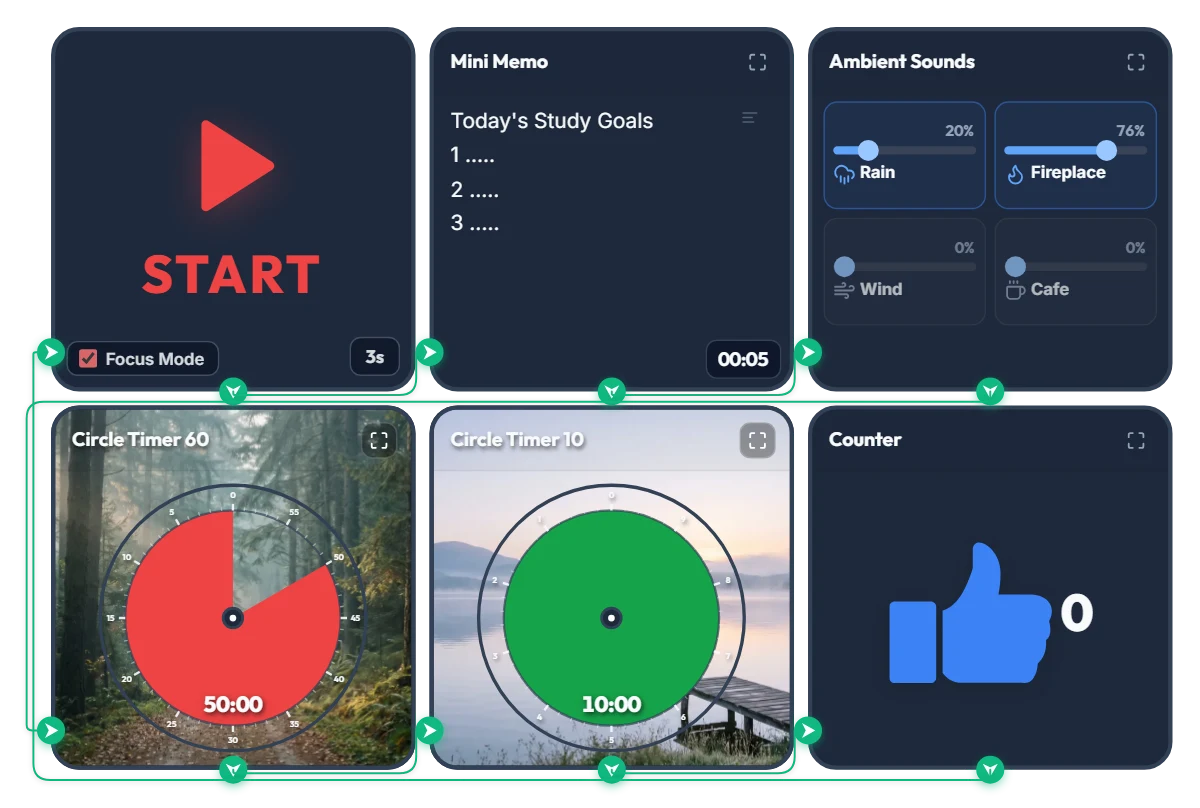
Rainy Forest Cabin Study Timer: Auto Rain & Fireplace ASMR + 50/10 Focus Loop
Tired of juggling a white-noise tab, a separate timer app, and a notepad just to start studying? Hit START once and this board automatically displays your study goals, launches a cozy rain-and-fireplace soundscape, and runs an infinite 50-minute focus / 10-minute break cycle in full-screen Focus Mode. 📌 Why a Misty Forest Trail & Calm Lakeside Background? According to Attention Restoration Theory (ART) in environmental psychology, the directed attention we use for problem-solving and deep reading fatigues rapidly after about 45–50 minutes. When you glance up to check your remaining time, seeing natural scenery like deep forest greens and calm water triggers "soft fascination"—allowing your brain and eyes to rest without breaking your study flow. As the red disc shrinks during your 50-minute session, a quiet forest trail gradually opens up; during your 10-minute break, a green disc reveals a peaceful lakeside pier to help your mind reset. ⚙️ How the 5-Step Automatic Study Loop Works 1. 5-Second Goal Splash: Hitting START enters Focus Mode and expands the Mini Memo full-screen for 5 seconds so your top 3 study goals lock into focus right before the clock starts. 2. Continuous Rain & Fireplace ASMR: A gentle mix of rain (20%) and crackling fireplace (76%) starts automatically and stays playing seamlessly across both study and break intervals so your focus is never jarred by sudden silence. 3. 50-Minute Forest Focus Disc: Track your remaining study block at a glance as the red disc counts down clockwise. 4. 10-Minute Lakeside Break Disc: Automatically switches to a 10-minute green break timer when your session finishes—step back, stretch, and rest your eyes. 5. Auto Session Counter (+1) & Infinite Loop: Every completed 50/10 block ticks the counter up by +1 and loops right back into your next study round. 💡 Quick Tips to Make It Your Own Study Space • Click directly on the "1. ....." lines inside the Mini Memo on screen to type your top 3 subjects or tasks for today. • Feel free to adjust the focus/break durations (50m/10m) and ambient sound sliders to fit your pace—just bookmark this page afterward and your custom settings will be saved right where you left them! ❤️ Cheering on everyone putting in the hours at their desk today! If this board helped you stay in the zone, tap the heart button and share your favorite study ratio or ASMR sound mix in the comments! ✨
 Amelia Miller
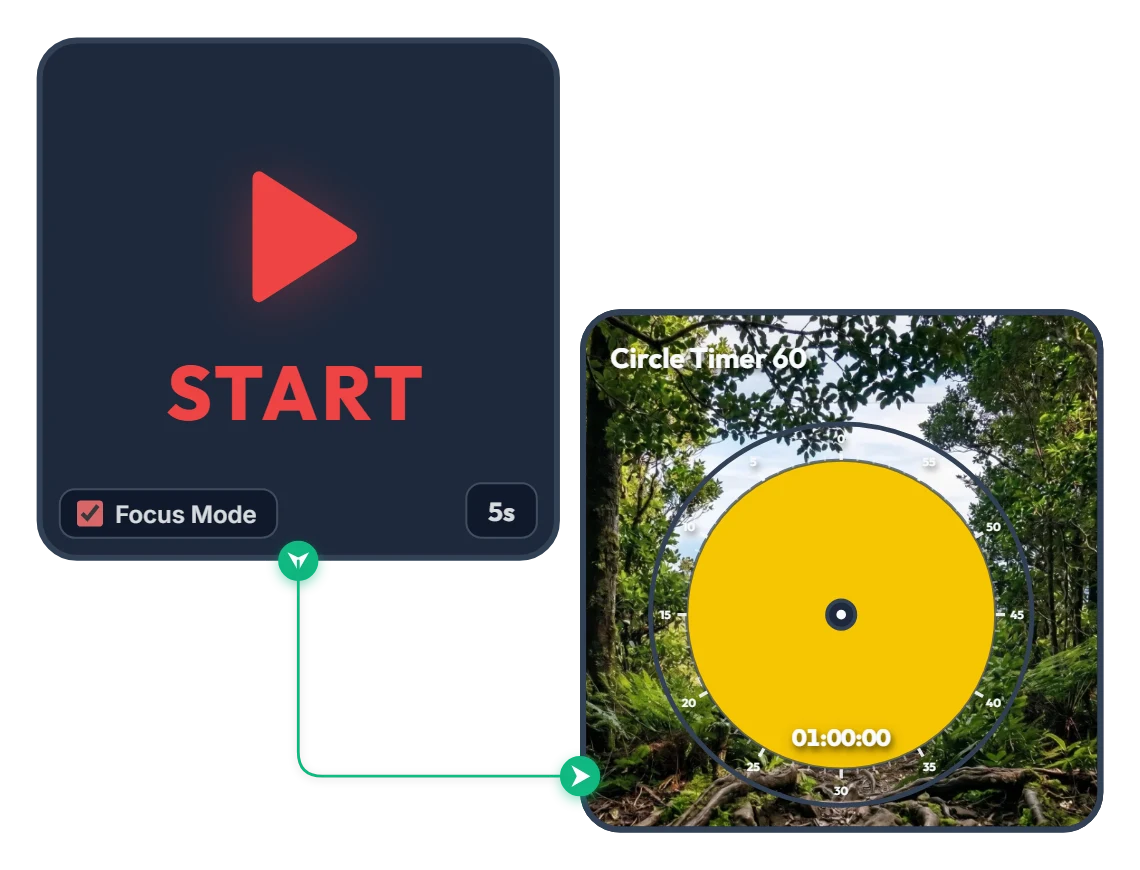
From Dense Woods to Wide-Open Skies! A 60-Minute Achievement Timer to Carry You Through the Hour
As the yellow disc shrinks and clears the dense forest, a victorious silhouette with arms raised high and a sweeping mountain range open up across your screen. Built with zero clutter—just a START widget and a 60-minute Circle Timer—this minimalist focus board helps you stay locked in until the finish line. When you press START, Focus Mode expands the timer to fill the board frame, guiding you steadily toward completing your full hour like a calm climb to the summit. 📌 Turn This On Whenever You Want to Finish Strong (Everyday Scenarios) • 1 Hour of Distraction-Free Deep Work (Office & Freelance) Put this on when tackling a major deliverable like a proposal, coding sprint, design layout, or video edit. Watching the yellow disc gradually fade and the horizon open up helps you resist distractions and claim a full, unbroken hour. • Breaking Through Today's Chapter or Practice Exam (Students) Ideal for working through dense textbook chapters or completing a full set of past exam questions. Just like emerging from thick woods onto an open ridge, you get a rewarding visual payoff at the end of a focused hour. • Miracle Morning 60-Minute Routine Start your morning grounded with reading, journaling, language practice, or meditation. The warm yellow glow and serene mountain scenery gently wake up your focus. • 1 Hour of Quiet Reading & Reflective Writing Silence phone notifications and message alerts for a full hour to immerse yourself deeply in a book or a piece of writing on the side of your monitor. ⚙️ How It Works & How to Customize Right on Screen Press START and after a 5-second breath-centering countdown (5s), Focus Mode activates—filling the board with the yellow 60-minute Circle Timer and starting the countdown. No complicated setup needed—just click directly on the board above to match your pace: • Change Prep Countdown: Click '5s' at the bottom right of the left START widget to adjust the pre-start pause anywhere from 0 to 59 seconds. • Adjust Focus Duration: Click the center of the right Circle Timer 60 widget to set any duration within 60 minutes (such as 45 or 50 minutes) that fits your goal. ❤️ If you found this helpful, tap the heart button and share how you used it in the comments—your tip could be a huge help to others!
Amelia Miller
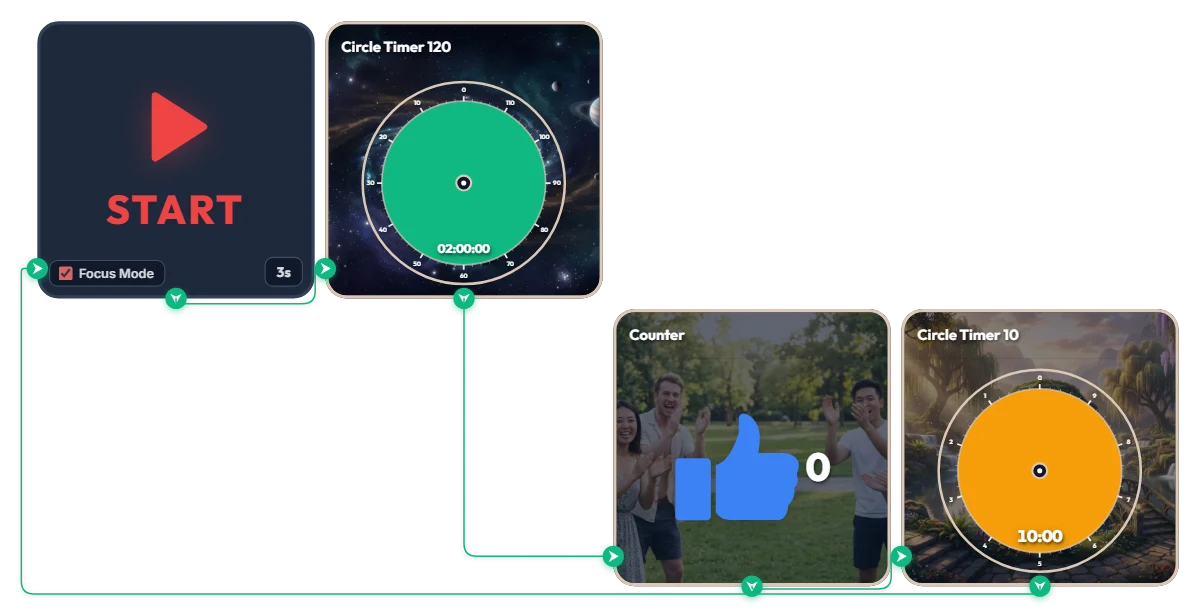
Want 2 Full Hours of Uninterrupted Deep Focus? 120-Min Deep Work + 10-Min Break Auto-Loop Timer
Tackling a complex project or long study session and want to dive deep for two full hours without breaking your flow? This automated loop timer is built for sustained, long-haul deep work. When you hit 'START', a 3-second countdown triggers Focus Mode—expanding only the active widget to fill the board frame while hiding the rest. It runs a seamless infinite loop: 120 minutes of focus (green) → achievement counter (+1) → 10 minutes of rest (orange), then automatically starts the next round. Because it doesn't force your browser into full screen, it sits cleanly alongside your work window or on a second monitor. 📌 Everyday Scenarios Where This Shines • Coding, Design & Video Editing (Deep Work) For complex tasks like programming, 3D rendering, or video editing that demand long stretches of uninterrupted momentum, the green 120-minute gauge keeps you locked in without mid-flow interruptions. • Practice Exams & Timed Mock Tests Simulate real test conditions for 2-hour certification exams, language tests, or 100-minute university entrance sections, followed by an exact 10-minute break to review your score. • Thesis Writing, Research & Deep Reading When your train of thought matters most, silence notifications for two solid hours and immerse yourself completely in a single topic or textbook. • Weekend & Holiday Study Marathons (Track Your Streak) Every time you complete a 120-minute block, the blue thumbs-up counter automatically ticks up by 1—giving you visible proof of how many sessions you crushed today. ⚙️ How It Works & How to Customize Right on Screen Press START and after 3 seconds, Focus Mode activates and fills the board with the green 120-minute timer. Once time is up, it logs +1 on the achievement counter and automatically switches to the orange 10-minute break timer—looping right back into the next 120-minute session when your break ends. No complicated setup needed—just click directly on the board above to match your personal work rhythm: • Change Prep Countdown: Click '3s' at the bottom right of the START widget to adjust the start delay anywhere from 0 to 59 seconds. • Adjust Focus Duration: Click the center of the green Circle Timer 120 widget to set any duration within 120 minutes (such as 90 or 100 minutes) that fits your stamina. • Adjust Break Duration: Click the center of the orange Circle Timer 10 widget to change your break to any duration within 10 minutes (such as 5 or 8 minutes). ❤️ If you found this helpful, tap the heart button and share how you used it in the comments—your tip could be a huge help to others!
Amelia Miller
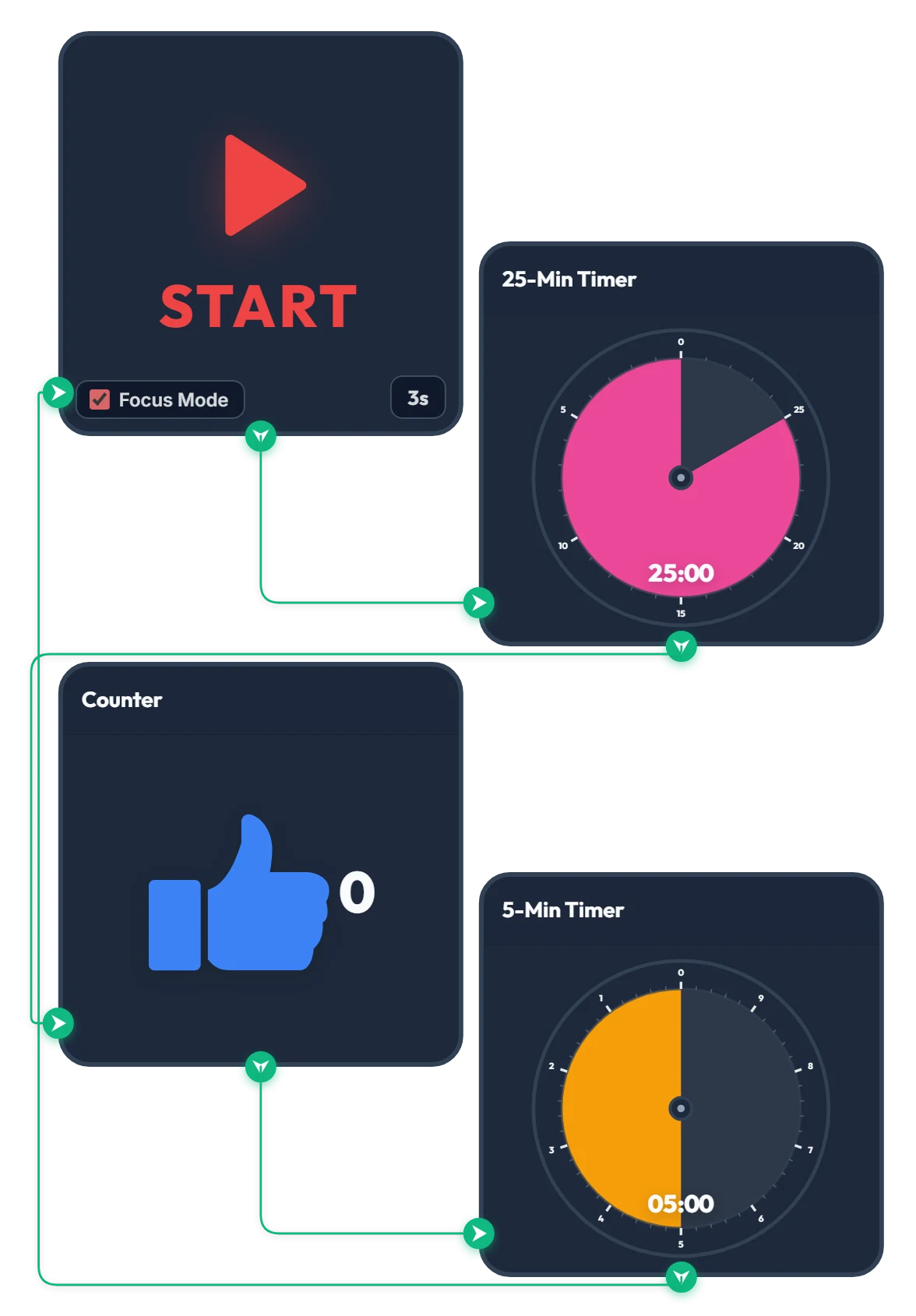
25-Min Focus & 5-Min Break Pomodoro Timer
Press START and, after a quick 3-second countdown, the 25-minute focus timer begins automatically. Once the 25 minutes are up, the counter goes up by 1 and the 5-minute break timer starts right away. When your 5-minute break finishes, it loops straight back to the 3-second countdown so the cycle keeps going on its own. How many cycles can you make it through? Give it a try—if you find it helpful, please tap the heart and leave a comment below!
Amelia Miller