Curated Timer Workflows & Dashboards
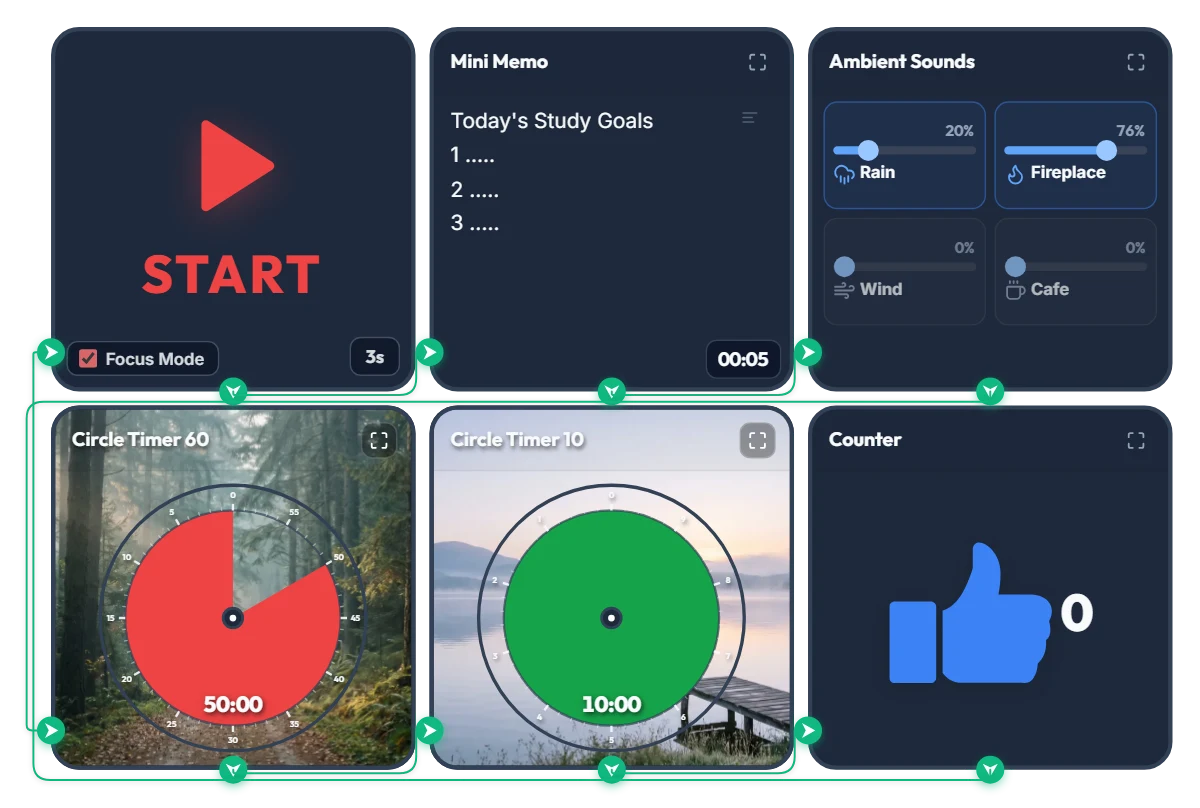
Rainy Forest Cabin Study Timer: Auto Rain & Fireplace ASMR + 50/10 Focus Loop
Tired of juggling a white-noise tab, a separate timer app, and a notepad just to start studying? Hit START once and this board automatically displays your study goals, launches a cozy rain-and-fireplace soundscape, and runs an infinite 50-minute focus / 10-minute break cycle in full-screen Focus Mode. 📌 Why a Misty Forest Trail & Calm Lakeside Background? According to Attention Restoration Theory (ART) in environmental psychology, the directed attention we use for problem-solving and deep reading fatigues rapidly after about 45–50 minutes. When you glance up to check your remaining time, seeing natural scenery like deep forest greens and calm water triggers "soft fascination"—allowing your brain and eyes to rest without breaking your study flow. As the red disc shrinks during your 50-minute session, a quiet forest trail gradually opens up; during your 10-minute break, a green disc reveals a peaceful lakeside pier to help your mind reset. ⚙️ How the 5-Step Automatic Study Loop Works 1. 5-Second Goal Splash: Hitting START enters Focus Mode and expands the Mini Memo full-screen for 5 seconds so your top 3 study goals lock into focus right before the clock starts. 2. Continuous Rain & Fireplace ASMR: A gentle mix of rain (20%) and crackling fireplace (76%) starts automatically and stays playing seamlessly across both study and break intervals so your focus is never jarred by sudden silence. 3. 50-Minute Forest Focus Disc: Track your remaining study block at a glance as the red disc counts down clockwise. 4. 10-Minute Lakeside Break Disc: Automatically switches to a 10-minute green break timer when your session finishes—step back, stretch, and rest your eyes. 5. Auto Session Counter (+1) & Infinite Loop: Every completed 50/10 block ticks the counter up by +1 and loops right back into your next study round. 💡 Quick Tips to Make It Your Own Study Space • Click directly on the "1. ....." lines inside the Mini Memo on screen to type your top 3 subjects or tasks for today. • Feel free to adjust the focus/break durations (50m/10m) and ambient sound sliders to fit your pace—just bookmark this page afterward and your custom settings will be saved right where you left them! ❤️ Cheering on everyone putting in the hours at their desk today! If this board helped you stay in the zone, tap the heart button and share your favorite study ratio or ASMR sound mix in the comments! ✨
 Amelia Miller
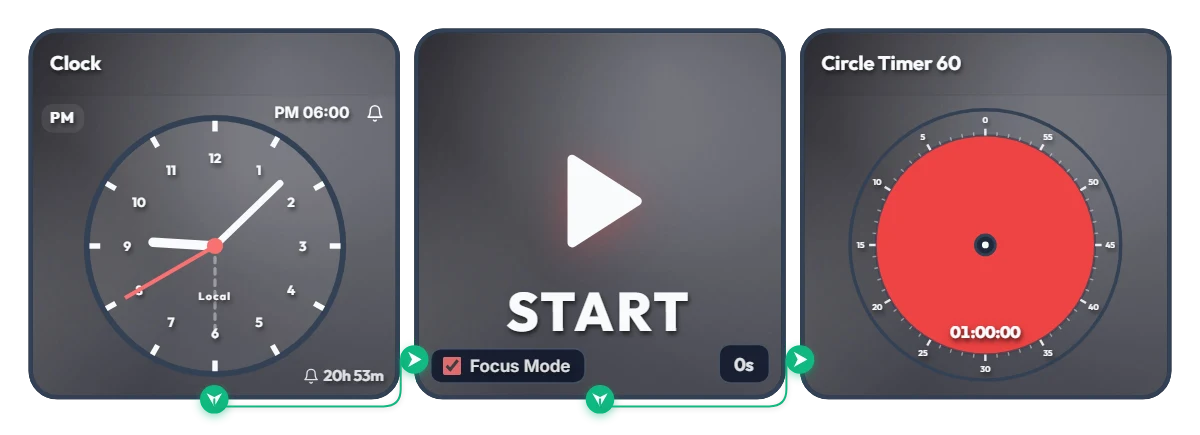
Keep Saying "I'll Start at 6 PM" and Putting It Off? Auto-Start 1-Hour Focus Timer
Ever tell yourself "I'll start right at 6:00 PM," only to lose an hour scrolling on your phone? Stop relying on willpower and let your screen flip the switch for you. This board is a scheduled automation routine. The moment your set time arrives (6:00 PM by default), Focus Mode cleanly hides the other widgets and expands the 60-minute circle timer to fill the entire board frame—starting the countdown immediately. Because it doesn't force your browser into full screen, it's ideal for keeping alongside your work window or on a second monitor. 📌 Everyday Scenarios Where This Shines • After-Work Evening Routine (PM 06:00 – 07:00) Beat post-work sluggishness. At 6:00 PM sharp, your board transforms into a bold red 60-minute timer, nudging you straight into reading, language learning, or a home workout without procrastinating. • Work-From-Home Morning Kickoff (AM 09:00) Struggling to transition from the couch to your desk? Change the alarm to 9:00 AM so your screen automatically switches into focus view and protects your first golden hour of deep work. • Evening Study & Exam Prep (PM 08:00) Overcome post-dinner fatigue with a clear visual rule: when the clock hits 8:00 PM, commit to one distraction-free hour at your desk. • 1-Hour Deadline Sprint Set the alarm one hour before a report or assignment is due. Watching the red visual gauge shrink keeps your focus locked in until the final second. ⚙️ How It Works & How to Customize Right on Screen When the Clock hits the scheduled time, the START widget activates Focus Mode—hiding the other widgets so the 60-minute circle timer fills the board and begins counting down right away. No complicated setup needed—just click directly on the board above to tailor it to your routine: • Change Alarm Time: Click 'PM 06:00' at the top right of the left Clock widget to set your preferred start time. • Set Prep Countdown: Click '0s' at the bottom right of the middle START widget to add a buffer delay of up to 59 seconds (great if you need a moment to sit down and get ready after the alarm goes off!). • Adjust Timer Duration: Click the center of the right Circle Timer widget to set any duration within 60 minutes that matches your focus stamina. ❤️ If you found this helpful, tap the heart button and share how you used it in the comments—your tip could be a huge help to others!
Amelia Miller
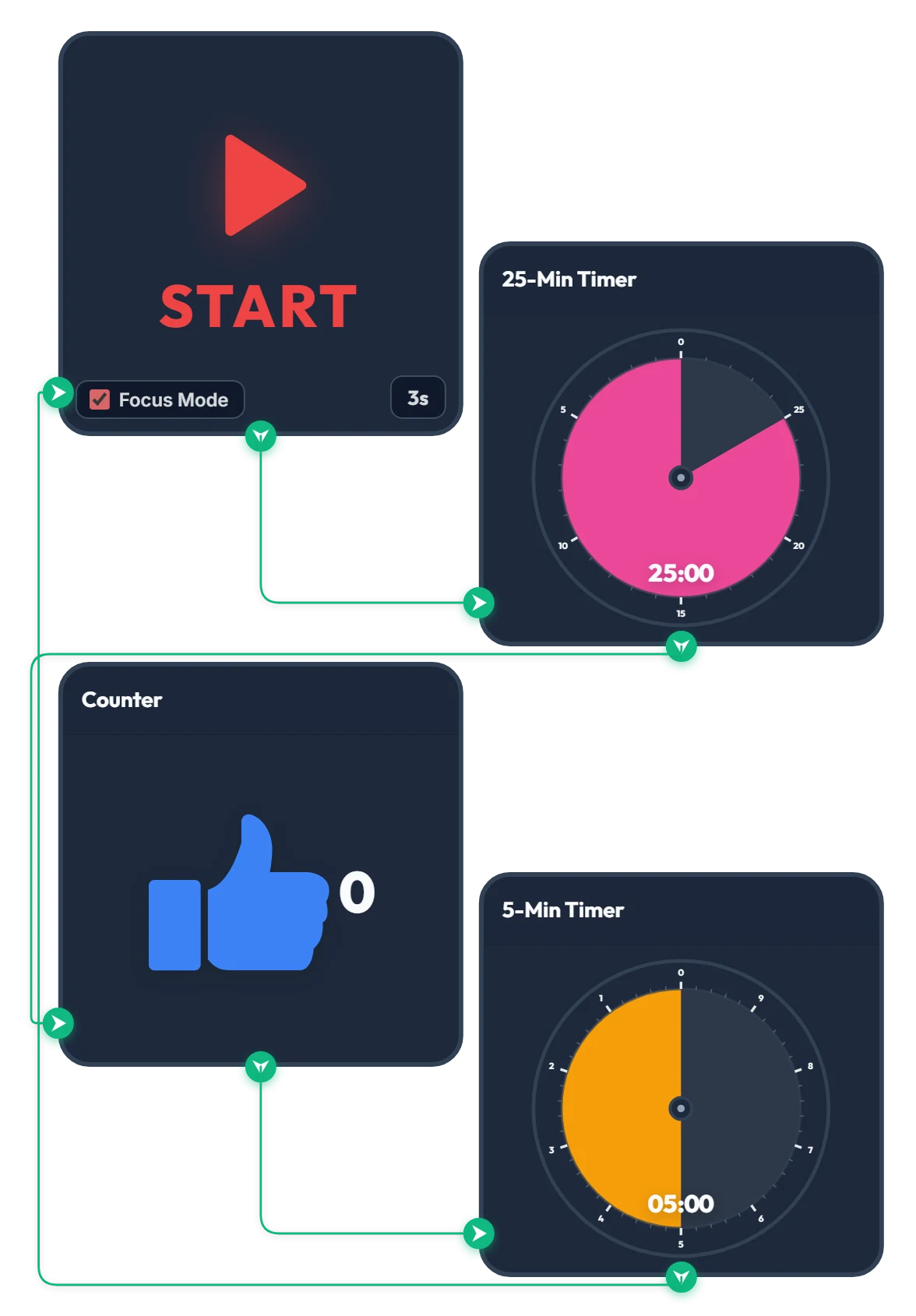
25-Min Focus & 5-Min Break Pomodoro Timer
Press START and, after a quick 3-second countdown, the 25-minute focus timer begins automatically. Once the 25 minutes are up, the counter goes up by 1 and the 5-minute break timer starts right away. When your 5-minute break finishes, it loops straight back to the 3-second countdown so the cycle keeps going on its own. How many cycles can you make it through? Give it a try—if you find it helpful, please tap the heart and leave a comment below!
Amelia Miller